
 English
 Nederlands
Click fraud protection features and how it works Everything ClickPatrol does
ClickPatrol finds the invalid clicks in your ad accounts, stops their sources from clicking again and keeps them out of your bidding data. Below, every feature sits under the job it does.
Done. We are opening your account.
Sent. Look in your inbox and create your account whenever it suits you.
Managing client accounts? Book a demo
 4.9
 4.5
Google Certified Click Tracker

Four jobs, one tag
Pick the problem you came to solve and jump to the features that handle it.
See which clicks are invalid
A verdict on every paid click, and reports that show where they come from.
- Click Insights
- Reports
- Analytics
Stop paying for them twice
Sources excluded in Google Ads for you, with rules you control.
- IP exclusions
- Protection rules
- Placements
Keep bots out of your data
Audiences and conversions built from real visitors only.
- Clean audiences
- Legitimate-only conversions
- CRM field
Claim credits, report savings
Invalid clicks reported to Google, and savings you can share.
- Reports to Google
- Savings reports
- Client access
What ClickPatrol does, in short
ClickPatrol scores every paid click, stops the sources of invalid clicks from clicking again and keeps bots out of your audiences, conversions and reports.
- What you see
- A verdict on every paid click. Safe, Suspicious or Invalid, with reports by campaign, keyword, device, location and placement.
- Where it blocks
- Google Ads: in your account. IP and placement exclusions are written for you. On Meta, Microsoft Ads, LinkedIn, TikTok, Pinterest and DV360, repeat clicks stop through the audiences you exclude. ChatGPT Ads is measured only.
- Where it stops
- The first click is still billed. No tool can prevent that one. ClickPatrol scores it as it lands and shuts out its source, so that source cannot click again.
- Clean data
- Bidding learns from people. Conversions and remarketing lists can count only visitors scored as legitimate, so Smart Bidding and Meta optimise towards real buyers.
- Price and trial
- From €71 a month, €59 billed yearly. A 7-day trial after a €0.01 verification; cancel within the week and pay nothing more. Compare plans
Look inside the dashboard
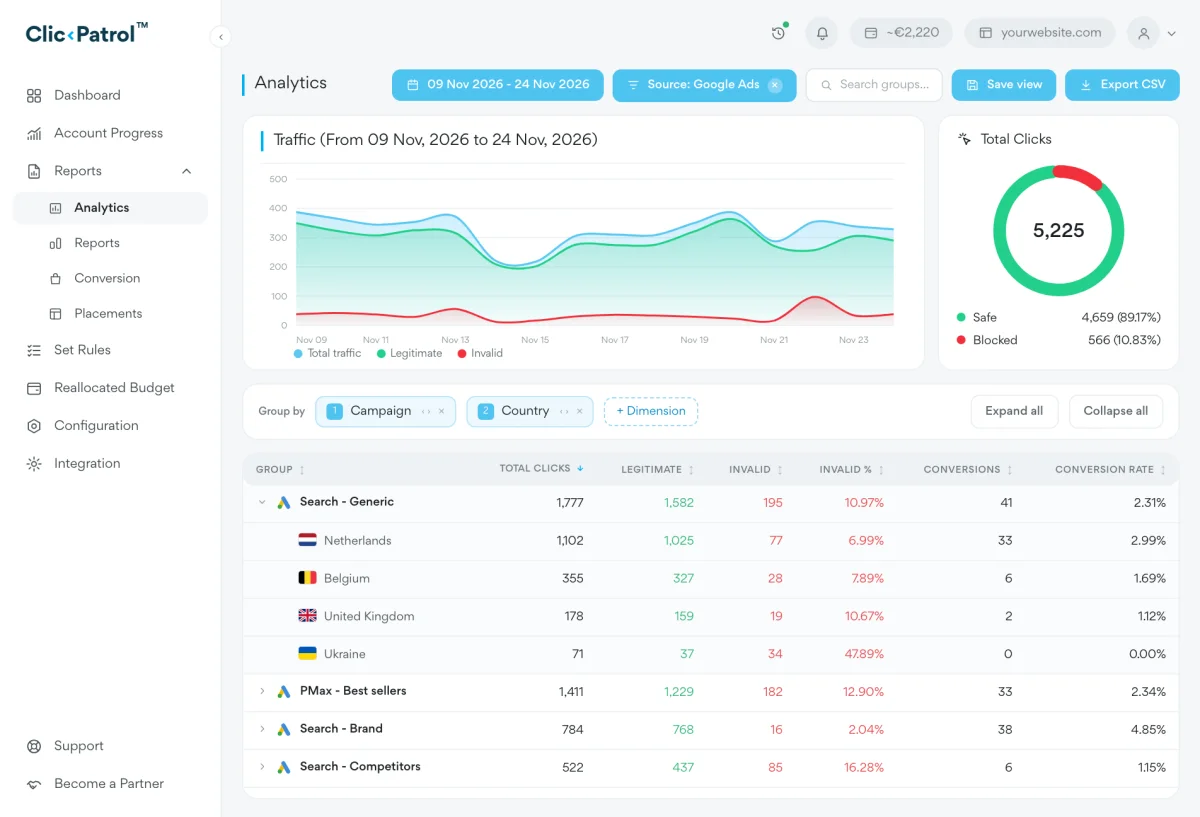
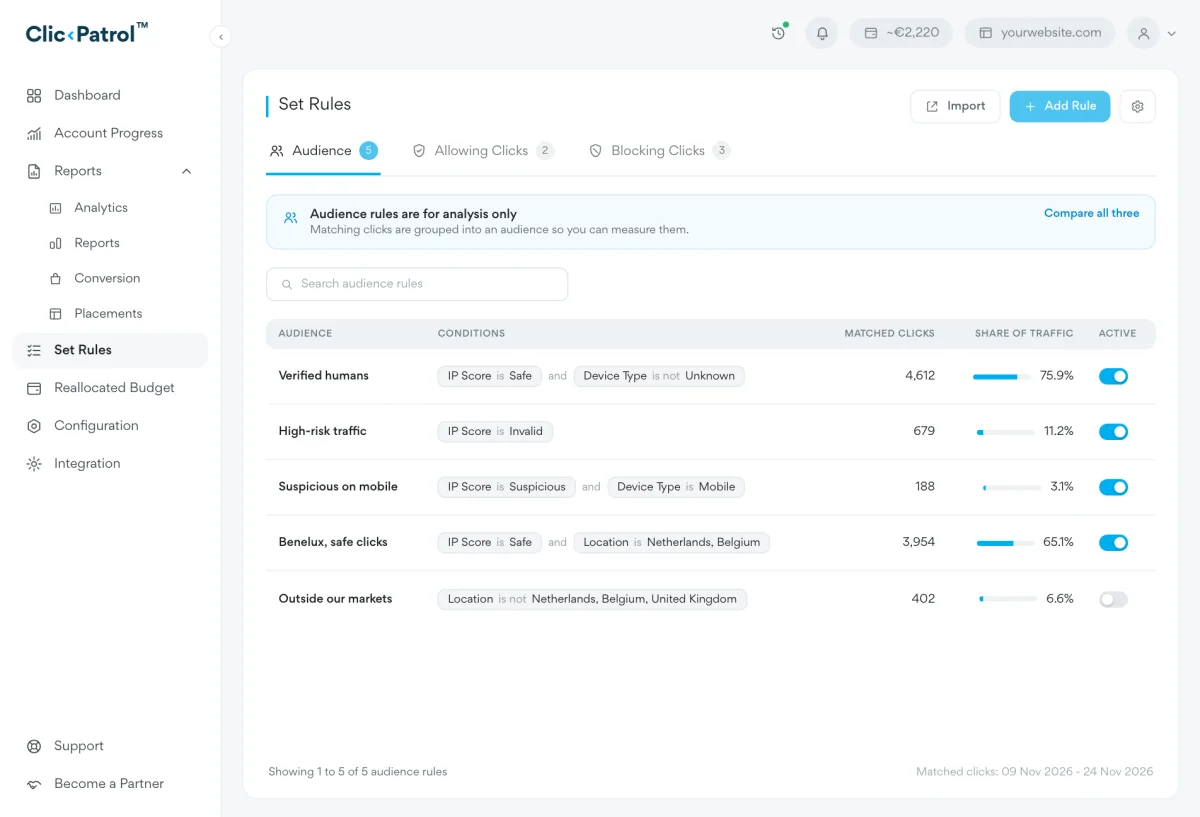
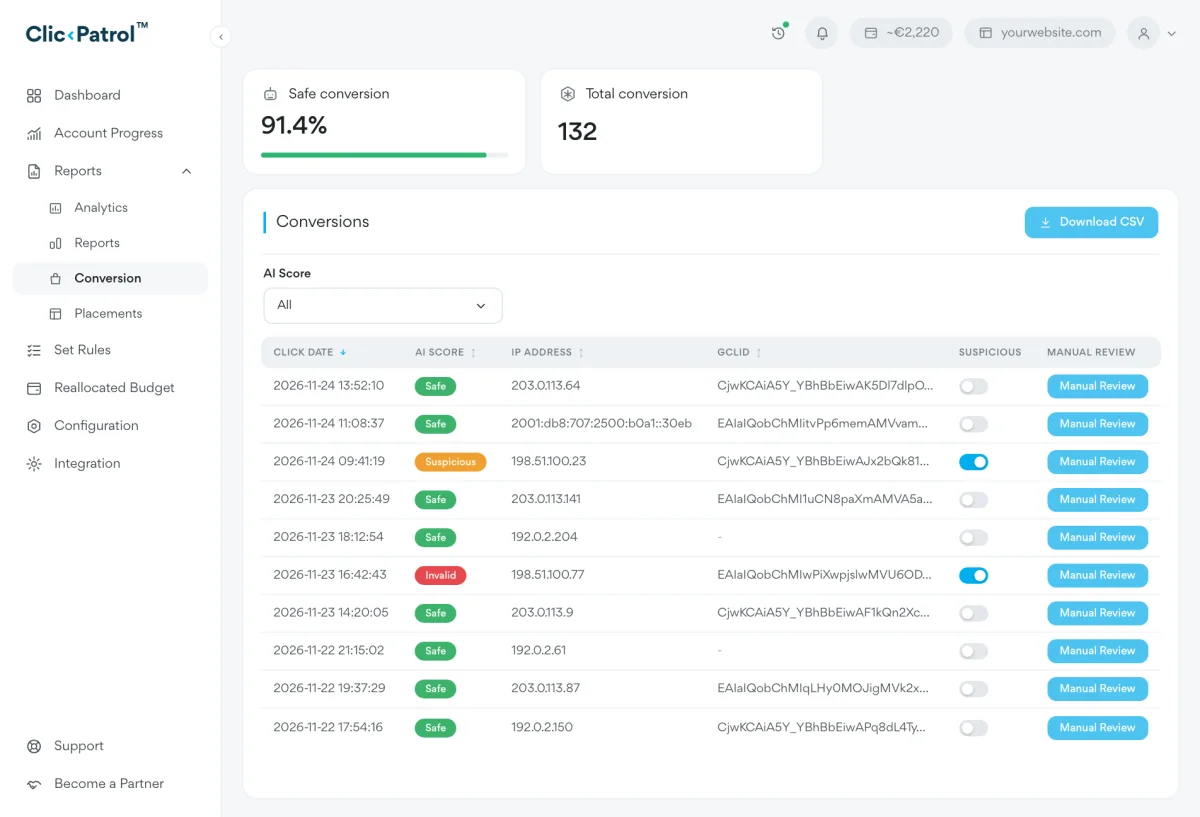
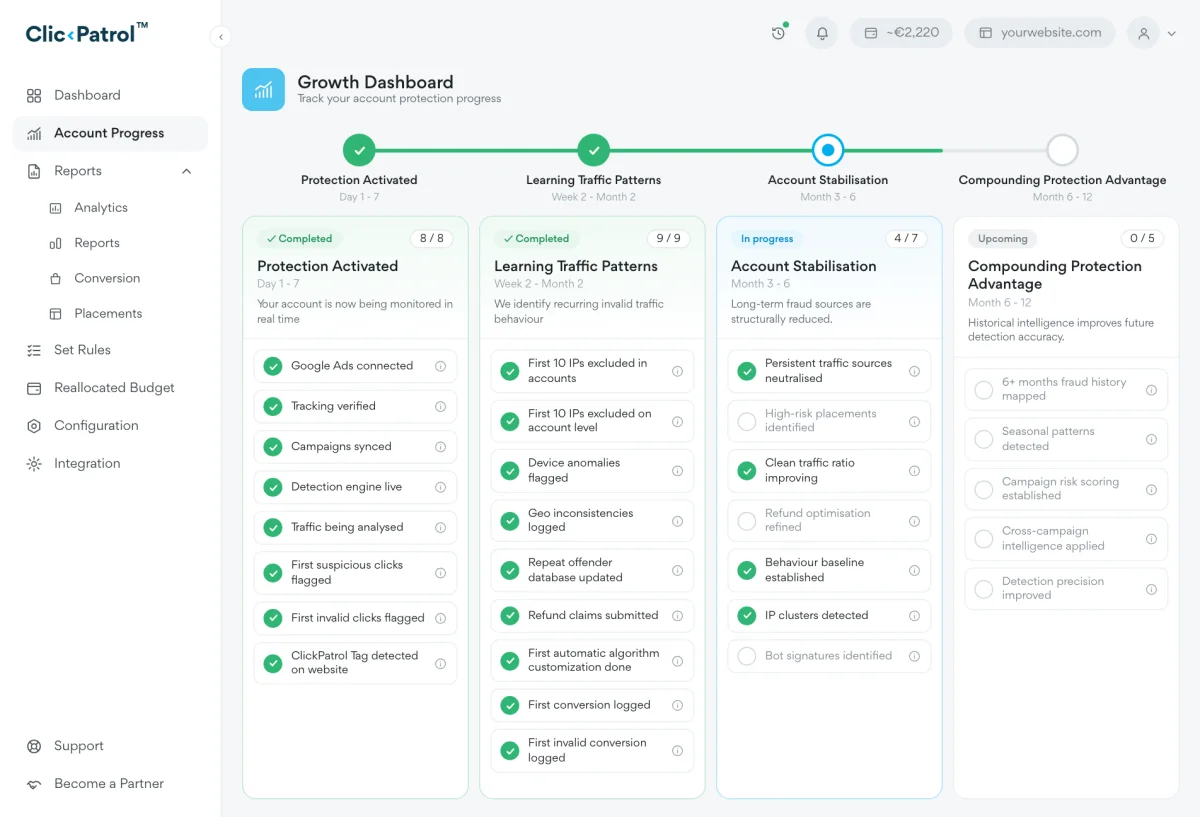
These are the screens you work in, filled with example data. During the 7-day trial they show your own campaigns.
Job 1 of 4 · Find
See which clicks are invalid, and where they come from
ClickPatrol checks more than 800 data points per click and no single one decides, so a real customer on hotel WiFi or a shared mobile network still gets through.
Sent straight to your landing page, as before.
Watched and scored again on the next click. Nothing is blocked yet.
Blocked. On Google Ads its source is excluded, so it cannot click again.
Click Insights
Check any click, down to the network it came from
Click Insights lists every click with its location, source platform, internet provider, browser, IP and verdict, and whether that IP is blocked right now. Repeated clicks from one provider, region or IP range stand out at a glance.
- Safe, Suspicious or Invalid on every paid click
- Filter the table and download it
- Matched conversions per click on the Conversion page
Reports and Analytics
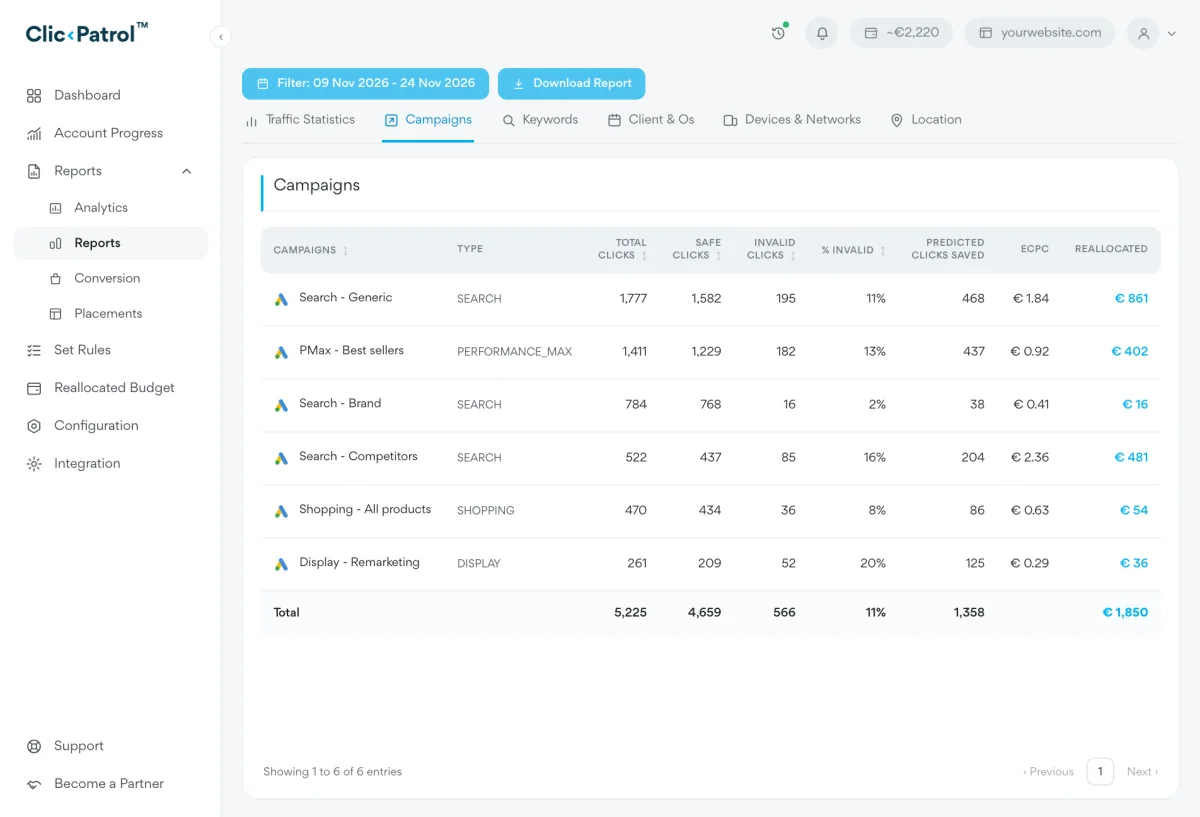
Find the campaigns and keywords that attract invalid clicks
Reports split every campaign and keyword into safe and invalid clicks, with the budget freed up by blocking. Other tabs break traffic down by device, browser, network and location. Analytics plots legitimate against invalid clicks per day, so you see the day a campaign was hit.
- Sort campaigns and keywords by share of invalid clicks
- Daily totals with conversions and conversion rate
- Save a view, or export the numbers to CSV
Job 2 of 4 · Block
Stop paying for the same source twice
On Google Ads, ClickPatrol writes the exclusions into your account. You decide how strict it is, and which campaigns and placements it touches.
Automatic IP exclusions
The source of an invalid click is shut out of Google Ads
When a click scores high risk, ClickPatrol excludes its source in your Google Ads account, so it cannot click your ads again. Search and Display campaigns get the exclusion per campaign or across the account; Performance Max and YouTube at account level, where Google allows it.
- Monitor only mode holds back updates while you review
- Leave chosen campaigns or ad groups out of updates
- Clear the whole block list when your targeting changes
Protection rules
Decide how strict it is for your audience
Six rules set what happens to VPN, proxy and dark web traffic, unknown devices and operating systems, and AI bots. Each starts on Algorithm, which judges click by click; switch to a hard block only when you know your audience well. Click threshold rules cap how often one IP may click.
- Up to five click threshold rules, such as 3 clicks in 10 minutes
- Whitelist your office, your agency and your testers
- Blacklist an IP and it stays blocked until you release it
Placement exclusion
Pull your ads off sites and apps that send mostly bots
The Placements page lists every website and app where your Google Ads collected clicks, with the share that was invalid and the budget involved. Sort from worst to best, flip the toggle, and the placement goes on your exclusion list.
- Safe and invalid clicks per placement
- Predicted clicks saved and budget reallocated per row
- The same data for DV360, where you add the exclusions yourself
Job 3 of 4 · Clean
Keep bots out of your audiences and your bidding
A bot that reaches your pixel lands in your remarketing lists and teaches Smart Bidding to find more of its kind. The ClickPatrol classification keeps it out of both.
Clean audiences
Stop retargeting visitors who were never real
The ClickPatrol tag in Google Tag Manager fires a legitimate or a suspicious event for every ad visit. Turn the suspicious one into an audience, exclude it across the account, and those visitors stop clicking your ads. Lookalikes and remarketing then start from real people.
- Events for GA4, Google Ads, Meta, Microsoft Ads, TikTok and Pinterest
- LinkedIn Insight Tag fires on legitimate visits only
- Lookalike seeds built from legitimate leads
Smart Bidding and conversions
Let bidding learn from real leads only
Add a second conversion action that only fires when ClickPatrol classed the visit as legitimate, and let campaigns bid on that one. Bot form fills stop counting as wins, so Smart Bidding and Meta optimise towards people who can buy.
- Works for Google Ads, GA4 key events and the Meta Pixel
- A hidden form field tells your CRM which leads came from a suspicious visit
- Restores the Google Ads click ID when Safari strips it
Job 4 of 4 · Prove
Claim credits and show what it saved
ClickPatrol reports invalid clicks to Google for you and turns the savings into a report you can hand over.
Reports to Google
Invalid clicks reported to Google for you
As a Google Certified Click Tracker, ClickPatrol sends Google the evidence behind each invalid click. Google filters part of it before you are billed. Of the clicks that go to manual review, about 5% come back as a credit after 4 to 8 weeks.
- Credits appear in Google Ads billing as invalid activity
- Kept apart from the savings ClickPatrol reports
- Each report also tells Smart Bidding which clicks not to learn from
Savings reports
Give whoever signs off the budget a number to check
Reports show per campaign how many clicks were saved and how much budget went back to real visitors. Pick how savings are presented, export to CSV, or pull clicks and the monthly savings report through the public API. Agencies keep every client in its own account under one login.
- Three savings reporting modes, to match how you report
- Invite colleagues or clients with reports-only access
- Switch between client accounts from one menu
By platform
What ClickPatrol does on each ad platform
Google Ads lets ClickPatrol write exclusions into your account. Most other platforms work through audiences: exclude the visitors ClickPatrol flags and their repeat clicks stop. ChatGPT Ads is measured only.
| Platform | How repeat clicks are stopped | Also included |
|---|---|---|
| Google AdsSearch, Display, Performance Max, YouTube | Blocked in your accountIP exclusions written for you: per campaign or account-wide on Search and Display, account-wide on Performance Max and YouTube. Bad placements excluded with one toggle. | Invalid clicks reported to Google for credits. Clean audiences and legitimate-only conversions. |
| Microsoft Ads | Through audiencesExclude the suspicious remarketing list from your campaigns or ad groups. Flagged IPs can also be exported to Microsoft's own IP exclusions. | Reports per campaign and keyword. A legitimate list for retargeting. |
| MetaFacebook and Instagram | Through audiencesExclude the suspicious Custom Audience from your ad sets, and visitors ClickPatrol flagged stop seeing your ads. | Pixel and conversion events that fire on legitimate visits only. |
| Through audiencesThe Insight Tag fires only on visits ClickPatrol classed as legitimate, so bots never enter a LinkedIn audience you retarget. | Matched Audiences built from real visitors. | |
| TikTok | Through audiencesBuild an audience on the suspicious event and exclude it from your campaigns. | Reports per campaign and ad. |
| Through audiencesExclude the suspicious site visitor audience on each ad group you want protected. | Reports per campaign and ad group. | |
| DV360Display & Video 360 | Through audiencesExclude the suspicious audience on your line items. Sites and apps with mostly invalid clicks go into Apps & URLs exclusions, which you add in DV360. | Placement data per site and app, and gated pixels. |
| ChatGPT AdsOpenAI Ads | Measures onlyClickPatrol scores every tagged click and shows which were invalid. Budget and bids stay in OpenAI Ads Manager, where you act on it. | The same reports as your other channels, for a side-by-side view. |
| Other paid trafficCustom links | Measures onlyNewsletters, affiliate deals, QR codes and partner placements are scored like ad clicks. You act on the result at the source. | Account Progress shows each source as connected, with its click count. |
Getting started
Set up your account in three steps
Connect Google Ads first. The Integration Hub has a step-by-step guide for every other channel.
Connect your channels
Link Google Ads, then add the ClickPatrol tag through Google Tag Manager. Every other channel builds on that tag plus its own UTM template.
Watch the first classifications
The 7-day trial scores every click and changes nothing in your ad accounts. A new click can take up to 30 minutes to show up in the dashboard.
Activate a plan
Pick Starter or PRO. On Google Ads, sources of invalid clicks are then excluded and reported to Google; elsewhere, your exclusion audiences keep repeat clicks out.
Fraud types and problems
Traffic with no intention of buying
Different sources, same result: your budget goes to visitors who were never going to convert.
Reviews
What advertisers report after turning it on
4.974 reviews 5.018 reviews
 5.051 reviews4.523 reviews
Reduced click fraud and saved ad budget with ClickPatrol
“ClickPatrol was incredibly easy to set up it started monitoring our ad campaigns within minutes. The dashboard is clean and gives a clear view of where clicks are coming from.”
Saved us thousands in wasted ad spend
“I manage ads for an e-commerce brand, and we were seeing strange spikes in clicks with zero conversions. After starting with ClickPatrol, the difference was immediate. Within two weeks, our ROAS improved and the fake traffic disappeared. The price easily pays for itself.”
Efficient Tool for Serious Advertisers!
“Gives full transparency into traffic sources. Detects bots, VPNs, and duplicate clicks. Easy to customize the blocking settings.”
Read at the source on 16 November 2026 for G2, 4 November 2026 for Capterra and SourceForge, and 11 August 2026 for Trustpilot. Read all customer reviews
Questions
Questions about the features
Does ClickPatrol block a click before I pay for it?
No tool can stop the first click from a new source being billed. ClickPatrol scores that click as it lands and, on Google Ads, excludes its source so it cannot click again. It also reports the invalid click to Google, and any credit Google approves shows up in your Google Ads billing.
Can I check the classifications before anything is blocked?
Yes. The 7-day trial only measures: you see every scored click and what the invalid ones cost, and nothing changes in your ad accounts. On a paid plan, monitor only mode under Configuration keeps scoring traffic without sending updates to Google Ads until you switch it off.
Is every feature on every plan?
Yes. Starter and PRO carry the same protection for unlimited brands and ad platforms: exclusions, custom rules, clean remarketing lists, Smart Bidding signals and junk-lead filtering. PRO only raises the number of protected clicks. The Agency plan adds client accounts, with reporting kept separate per client, and volumes above 100,000 clicks a month.
Can I set my own blocking rules?
Yes. Six protection rules cover VPN, proxy and dark web traffic, unknown devices, unknown operating systems and AI bots, and all of them start on Algorithm. You can add up to five click threshold rules, such as 3 clicks in 10 minutes, and whitelist or blacklist any IP by hand.
Can my team or my clients log in?
Yes. The account owner invites people under Configuration, Invitations, as Admin or with access to reports and the dashboard only. Invited users cannot add accounts or see billing. Agencies connect client accounts through one Google Ads MCC and switch between them from the account menu, each with its own data.
How fast do clicks show up in the dashboard?
Detection and blocking happen as the click lands. The dashboard can take up to 30 minutes to show a new click, often less. Google Ads traffic usually appears within a few hours of the first new ad click after setup; if another channel shows nothing after 24 hours, check its UTM template.
See every feature on your own traffic
A 7-day trial after a €0.01 verification. The trial measures every click and changes nothing in your ad accounts. Rolling it out for a team? Book a demo.
“ClickPatrol has become the definitive source for our paid traffic quality data. Its reliability is what allows my team to operate with confidence.”
Avis South Africa, Google Ads: 123.3% more conversions and a 36.1% lower CPA in about three months. Read the case
Start your 7-day free trial
Done. We are opening your account.
Sent. Look in your inbox and create your account whenever it suits you.