Ad fraud analytics for agencies Show each client where invalid clicks hit, campaign by campaign.

ClickPatrol breaks invalid traffic down by campaign, keyword, device, network and location for every client account, and exports it for the monthly report.

€0.01 card checkSet up in 2 minutesCancel within 7 days, nothing more to pay

Each email includes an unsubscribe link. Read our privacy policy.

daar-om.nl found up to 20% invalid clicks on some client accounts

G24.9 Trustpilot4.5 Google Certified Click Tracker
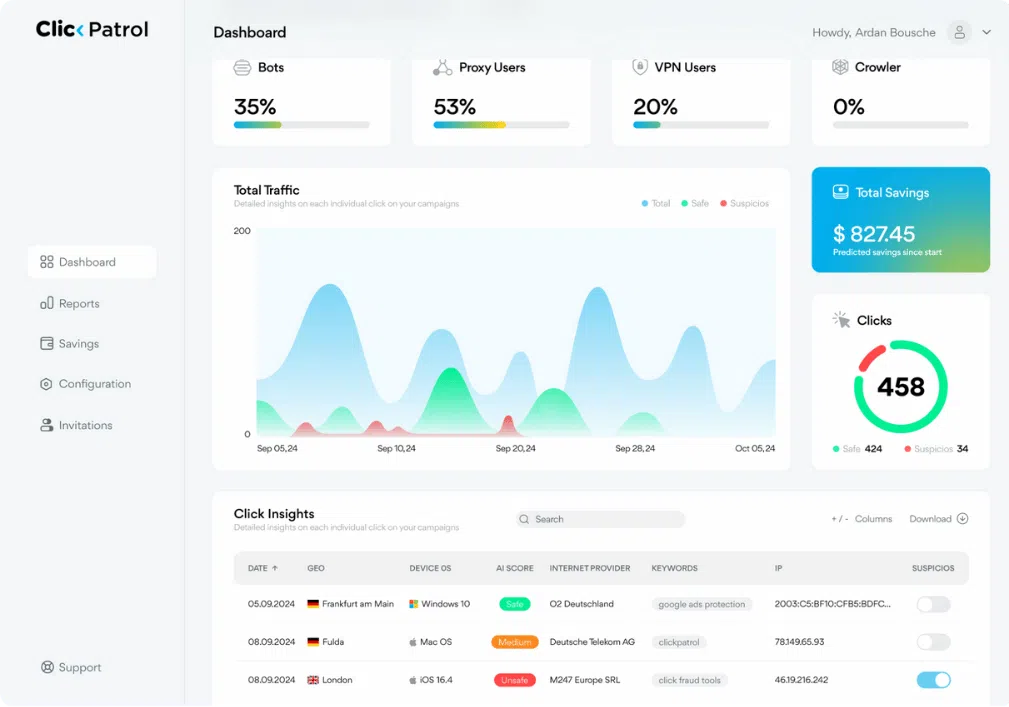
ClickPatrol dashboard with total traffic, safe and suspicious clicks, total savings and the Click Insights table

Ad fraud analytics in ClickPatrol, in short

For each client account, ClickPatrol shows which campaign, keyword, network or placement carried the invalid clicks, and backs every figure with click-level rows you can hand over.

What the Reports cover
Six views per client. Campaigns and keywords, client and OS, devices and networks, location, placements and conversions, each with its own split of safe and invalid clicks.
What ClickPatrol does
From leak to report line. Sort campaigns on invalid share, check the clicks behind each figure in Click Insights, then download the report or invite the client with view-only access.
Where it stops
A forecast, not an invoice. Reallocated budget is a 30-day estimate and will not match the Google invoice. Google's own credits, and bot servers blocked on connect, are not in it.
Who it is for
Agencies on one MCC. Each client is its own account with separate settings and reports. PRO covers 10,000 to 75,000 clicks; above 100,000, a quote after a demo.
Price and trial
From €71 a month, €59 billed yearly. A 7-day trial after a €0.01 card check; cancel within the week and pay nothing more. Compare plans

Reports

Six views that answer a client's questions

Each view covers one client account and one date range. Together they show where the budget leaked, which is what ClickPatrol's click fraud protection then acts on.

Campaigns and keywords

Every campaign with its type, total, safe and invalid clicks, the invalid share, predicted clicks saved, effective CPC and budget reallocated. The keyword view uses the same columns. Sort on invalid share and the worst campaign is on top.


Client and operating system

Clicks split by operating system, browser and language. A sudden cluster from one unusual combination is a pattern worth a line in the report.

Devices and networks

Clicks per internet provider and per device. Hosting and data-centre providers in that list deserve a question, because buyers browse from home and mobile networks.

Location

A map with country and region tables. Put it next to the client's targeting: clicks from regions nobody targeted point at invalid traffic.

Placements

For Display and Performance Max, every site or app that sent clicks, with its invalid share and a toggle to exclude it. The workflow is on our placement exclusion page.

Conversions

The share of conversions that came from traffic scored as safe, with each conversion matched to its click. Useful when a client asks whether the leads were real.

The day-to-day dashboard, the controls and the setup checklist are on our click fraud dashboard page.

How agencies use it

From a leak to a line in the monthly report

Find where invalid traffic concentrates, back it up click by click, and hand the client numbers they can check.

1Find

The campaign that carries the problem

Open Reports on a client account, set the date filter to last month and sort campaigns on invalid share. Then switch to the keyword view, and to the Location and Devices & Networks tabs, to see whether the problem is one region, one provider or one keyword.

  • Same columns for campaigns and keywords
  • A date filter per report
  • Download Report exports what you see

2Prove

Every number traced back to single clicks

A client who doubts the figure can see the clicks behind it. Click Insights shows each click with its time, location, platform, score, provider, browser, IP address and blocked status, and it exports to a file you can attach.

  • Filter on one campaign's suspicious clicks
  • One row per click, ready to share
  • Google's own invalid-click column gives no click detail

3Share

Client access without the controls

Invite the client to their own account with the Reports & Dashboard role. They see reports, cannot change settings, cannot add accounts and never see billing. Pick a savings reporting mode that matches what you put in your own reports. More on running many accounts: ClickPatrol for agencies.

  • Each client in its own account
  • Switch clients without logging out
  • Three savings reporting modes

Before a client asks

How the savings figure is built, and what it leaves out

The reallocated budget in your reports is a 30-day forecast. It uses the account's invalid click rate and volume, its industry and data from similar accounts to estimate what keeping the blocked sources out will save.

Two things are not in it. Known bot servers blocked the moment an account connects typically save another 0.4 to 0.9% of spend, but they never clicked, so there is nothing to forecast from. Credits from Google appear on the Google Ads invoice instead; see Google Ads refunds.

Worked example2,000 clicks a month, €500 budget, €0.25 per click

Example savings forecast by source of invalid clicks, from the ClickPatrol knowledge base
SourceShareClicksSaved
SEO and other tool bots0.41%8€2.05
Legal and compliance bots0.23%5€1.15
Scrapers0.18%4€0.90
Competitors1.23%25€6.15
Click farms0.14%3€0.70
Incidental non-human clicks5.20%104€26.00
Total7.39%148€36.95

Results

An agency that now puts it in every monthly analysis

daar-om.nl runs Google Ads for Dutch SMEs. After a two-week demo on several accounts it added ClickPatrol to its service and its client reports.

Agency
Up to 20%
invalid clicks on some accounts
+10%
leads for client Giordano
+58%
time on page for Giordano
Read the daar-om.nl case study →

We had difficulty estimating the amount of invalid traffic our customers receive on their campaigns, and we also had no idea how to exclude all of them properly.

René de Boer, product owner, daar-om.nl, on the time before ClickPatrol

Get started

First client report in a week

Connect through your Google Ads manager account (MCC) with Standard or Admin access. Each client account takes about 2 minutes.

  1. Start the trial

    Use your agency email and a €0.01 card check. The 7-day trial measures and bills nothing else.

  2. Add client accounts

    Link your MCC, then use Add Website in the account menu for each client. Settings and reports stay separate per client.

  3. Pull the first report

    After a week of scored clicks, open Reports, sort on invalid share and download it. Switch protection on when the client agrees.

Reviews

From agencies who report on traffic quality

G24.974 reviews
Capterra5.018 reviews
SourceForge5.051 reviews
Trustpilot4.523 reviews
★★★★★

Great for Agencies

“Detailed reporting helps identify every invalid click, while automated click blocking saves valuable ad spend. Managing multiple client campaigns is now much simpler.”

Micheal S.CEO, agencySourceForge
★★★★★

Good tool for agencies

“We’re a marketing agency, and we rolled out ClickPatrol on a number of client accounts. It's been reliable, and the multi account setup works well. In some cases, we added fraud protection without telling our clients. They saw performance improvements first.”

Brandon PatelMarketing agencyTrustpilot
★★★★★

Our Single Source of Truth for Ad Traffic Quality

“ClickPatrol has become the definitive source for our paid traffic quality data. Its reliability is what allows my team to operate with confidence. We no longer have to cross-reference data from multiple tools or doubt the numbers in our reports.”

David H.CEO & FounderG2

Read at the source on 16 November 2026 for G2, 4 November 2026 for Capterra and SourceForge, and 11 August 2026 for Trustpilot. Read all customer reviews

Questions

Before you put ClickPatrol in a client report

Can a client see the reports without touching any settings?

Yes. As the account owner you invite the client under Configuration, Invitations, and choose the Reports & Dashboard role. They register through the link in their email, see only the account you granted, and cannot change settings, add accounts or see billing. Admin is the other role, with full access.

All my clients sit under one MCC. Are their reports kept apart?

Yes. Every client is a separate account in ClickPatrol, with its own settings and its own reports, so numbers never mix. Moving from one client to the next is a click in the account menu, no new login. Adding accounts needs the main owner login and an MCC linked to ClickPatrol.

Will the savings figure match the client's Google invoice?

No, and it should not be presented that way. Reallocated budget is a 30-day forecast of what blocking saves. Credits that Google grants appear on the Google Ads invoice separately. If you report savings externally, the savings reporting mode lets you show basic metrics only or estimated savings.

Why does ClickPatrol's invalid share differ from Google's Invalid clicks column?

They count different clicks. Google's column holds clicks its systems removed before billing, so the client never paid for them. ClickPatrol scores the clicks that reached the landing page, which includes clicks Google billed. Some Search Partner sites skip tracking templates, which usually accounts for a 4 to 8% gap in totals.

What does ClickPatrol cost for an agency?

PRO starts at €83 a month for 10,000 to 75,000 clicks. Agencies above 100,000 clicks, or with many client brands, get a quote after a demo. Prices exclude VAT. Start with the 7-day trial on one client account. Reselling ClickPatrol to clients? Look at the partner programme.

Pull a client report from a week of real clicks

Connect one client account, let the trial score a week of Google Ads clicks and download the campaign view. End the trial before day 7 and no plan is billed.

Start your 7-day free trial

€0.01 card checkSet up in 2 minutesCancel within 7 days, nothing more to pay

Each email includes an unsubscribe link. Read our privacy policy.

Start your 7-day free trial

Enter your work email and go straight to your account setup.

€0.01 card checkSet up in 2 minutesCancel within 7 days, nothing more to pay

Each email includes an unsubscribe link. Read our privacy policy.