
 English
 Nederlands
Click fraud dashboard and traffic controls One screen each morning to see what your paid traffic did yesterday.
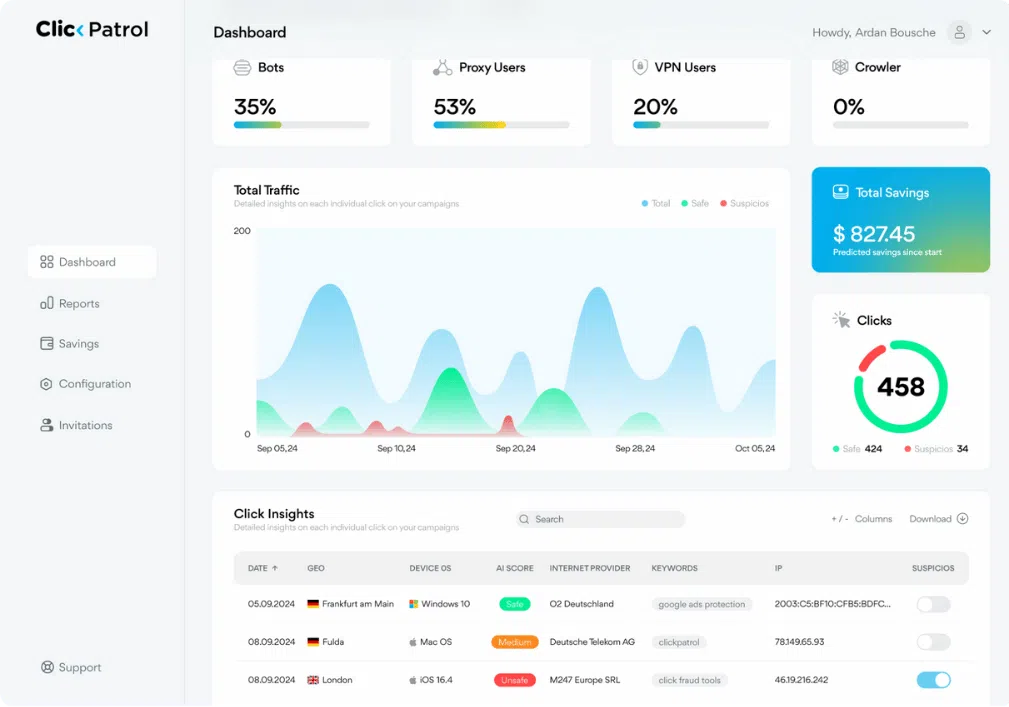
The ClickPatrol dashboard shows how much of your ad traffic was invalid, what was blocked and what that saved. The controls beside it decide how strict the blocking is.
Done. We are opening your account.
Sent. Look in your inbox and create your account whenever it suits you.
Avis checks it every morning; its cost per acquisition fell 36%
 4.9
 4.5
Google Certified Click Tracker
The ClickPatrol dashboard, in short
Four cards on the ClickPatrol dashboard sum up your paid traffic: the share classified invalid, the share from bots, the clicks blocked and the estimated protected spend.
- Below the cards
- Every click, every day. Click Insights lists each click with location, platform, score, provider, browser and IP. The Analytics page plots legitimate and invalid clicks per day; export them as CSV.
- What ClickPatrol does
- Protects while nobody looks. Exclusions run without anyone logged in. Configuration sets how strict: Monitor Only Mode, six traffic-type rules, up to 5 click threshold rules, a whitelist and a blacklist.
- Where it stops
- Not a mirror of Google Ads. Some Search Partner sites skip tracking templates, usually a 4 to 8% click gap, and calls from a call asset never reach your site.
- Is everything set up
- Account Progress tells you. Four phases with a checklist each, plus which ad channels are connected. A red item is a step still open.
- Price and trial
- From €71 a month, €59 billed yearly. A 7-day trial after a €0.01 card check; cancel within the week and pay nothing more. Compare plans
Where to look
The question you have, and the screen that answers it
Most days you need one number, not a report. This is where each answer lives in the ClickPatrol click fraud protection dashboard.
| Your question | Where | What you see |
|---|---|---|
| Was anything blocked overnight? | Dashboard | The Blocked Clicks card and the Click Insights table, newest click first, with a Blocked column per IP address. |
| Is invalid traffic rising or falling? | Analytics | Total, Legitimate and Invalid clicks per day on one chart, with a per-day table of clicks, invalid share, conversions and conversion rate. |
| Why was this click excluded? | Click Insights | One row per click: time, location, ad platform, score, internet provider, browser, IP address and whether that IP is blocked. |
| Is the setup finished? | Account Progress | Checklists per phase. A red item is a step that has not happened yet, such as a tag that was never detected on the site. |
| Which channels are actually connected? | Account Progress | Every traffic source with CONNECTED or NOT CONNECTED and a click count: Google, Facebook, Bing, LinkedIn, TikTok, Pinterest, DV360 and more. |
| What did protection save? | Dashboard | Estimated Protected Spend in your account currency. Configuration lets you pick how savings are shown across the dashboard. |
Need the split per campaign, keyword, device or region for a monthly report? That lives on Reports, covered on our ad fraud analytics page.
How it works
Watch, steer, then leave it running
The dashboard is for checking. Protection keeps working whether you open it or not.
1Watch
Every click, with the reason it was flagged
Click Insights lists each ad click with its location, ad platform, score, internet provider, browser and IP address. When one provider, one region or one IP range keeps coming back, that is worth a closer look. New clicks show up within 30 minutes, often sooner.
- Filter the table or export it
- Timezone and currency set to match your other tools
- The same view for every connected channel
2Steer
Decide how strict protection is
Each traffic-type rule, from VPN and proxy traffic to AI and GPT bots, starts on Algorithm and can be set by hand. Click threshold rules block any IP that clicks more often than you allow. The reasoning behind each verdict is explained on our bot detection page.
- Monitor Only Mode: score everything, send nothing to Google
- Whitelist your office before you test your ads
- Clear the whole block list within 24 hours
3Finish
A checklist that tells you what is still missing
Account Progress follows four phases, from Protection Activated in week one to Compounding Protection Advantage at month six to twelve. Each phase has a checklist with a green tick or a red cross per step, and the Traffic Sources block shows which channels send data.
- A channel marked NOT CONNECTED needs its UTM template
- A phase can show COMPLETED with a red item left
- Useful months later, not only at onboarding
Results
Part of the Avis morning routine
Car rental on Google Ads across African markets. The paid search consultant checks the low, medium and high-risk traffic split every day.
 Brand
- −36%
- cost per acquisition
- +123%
- conversions
- −3.4%
- cost per click
ClickPatrol is now part of my morning routine. Every day, I check the amount of low, medium, and high-risk traffic our campaigns receive and the percentage of fake traffic blocked.
Get started
Your own dashboard in a few hours
Connecting Google Ads takes about 2 minutes. The first scored clicks appear within a few hours of the next ad click.
Create the account
Work email, then a €0.01 card check. For 7 days that is the only charge.
Connect your channels
Sign in with Google for Google Ads. Meta, Microsoft Ads and the others connect from the Integration page with the ClickPatrol tag and their UTM templates.
Open Account Progress
Work through the red items, set your timezone and currency, and invite colleagues with dashboard-only access.
Reviews
From marketers who open it every day
4.974 reviews 5.018 reviews
 5.051 reviews4.523 reviews
Clean dashboard, real results
“I really like how simple and easy the interface is to use. There’s no clutter or confusing sections, so everything feels clear and straightforward. It also shows fraudulent clicks and how much money you’re saving in a very transparent way. I’d definitely recommend it to any digital marketing team.”
Finally, Transparent and Effective Click Fraud Protection
“ClickPatrol feels like a tool designed by people who actually understand digital marketing pain points. The UI is clean, the fraud detection is accurate, and I can prove ROI improvements quickly to stakeholders.”
Our Single Source of Truth for Ad Traffic Quality
“ClickPatrol has become the definitive source for our paid traffic quality data. Its reliability is what allows my team to operate with confidence. We no longer have to cross-reference data from multiple tools or doubt the numbers in our reports.”
Read at the source on 16 November 2026 for G2, 4 November 2026 for Capterra and SourceForge, and 11 August 2026 for Trustpilot. Read all customer reviews
Questions
Before you start using the dashboard
Do I have to check the dashboard every day?
No. Once protection is on, exclusions run without anyone logged in. The dashboard is there to check results, spot a new pattern or show someone else what happened. You can make it a daily habit, like the Avis consultant, or look once a week and let Account Progress flag setup gaps.
Why don't the click numbers match Google Ads exactly?
Both tools count differently. A small part of Google's Search Partner network does not run third-party tracking templates, which typically explains a gap of 4 to 8%. Calls from a call asset never reach your site. ClickPatrol, in turn, records a revisit on the same click ID that Google counts once.
Can colleagues see the dashboard without changing settings?
Yes. The account owner invites people under Configuration, Invitations, with one of two roles: Admin, or Reports & Dashboard only. Invited users see only the accounts you grant them. They cannot add accounts or see billing. Each invitee registers through the link in their own email.
How fresh is the data?
New clicks can take up to 30 minutes to appear in Click Insights and on the Analytics page, though it is often quicker. After you first connect Google Ads, expect traffic within a few hours of the first new ad click. If nothing shows up, the tracking template usually needs checking.
We run several websites. Is that one dashboard?
Each website runs as its own account with separate settings and reporting, and you switch between them from the account menu without logging out. PRO covers 10,000 to 75,000 clicks a month from €83; many brands or more than 100,000 clicks get a quote. See ClickPatrol for brands.
Look at a week of your own traffic before you decide
Start the trial, connect Google Ads and open the dashboard tomorrow morning. Prefer to look around first? Take the interactive dashboard tour. Cancelling inside the trial week costs nothing beyond the card check.
Start your 7-day free trial
Done. We are opening your account.
Sent. Look in your inbox and create your account whenever it suits you.