
 English
 Nederlands
Clean remarketing audiences Every bot that visits once joins your remarketing list.
A remarketing tag takes in every visitor it sees, bots included. ClickPatrol labels each ad visit legitimate or suspicious, so you exclude one group and retarget the other.
Done. We are opening your account.
Sent. Look in your inbox and create your account whenever it suits you.
Conservio, conservation travel on Google Ads: 14% cleaner traffic
 4.9
 4.5
Google Certified Click Tracker
Clean remarketing audiences, in short
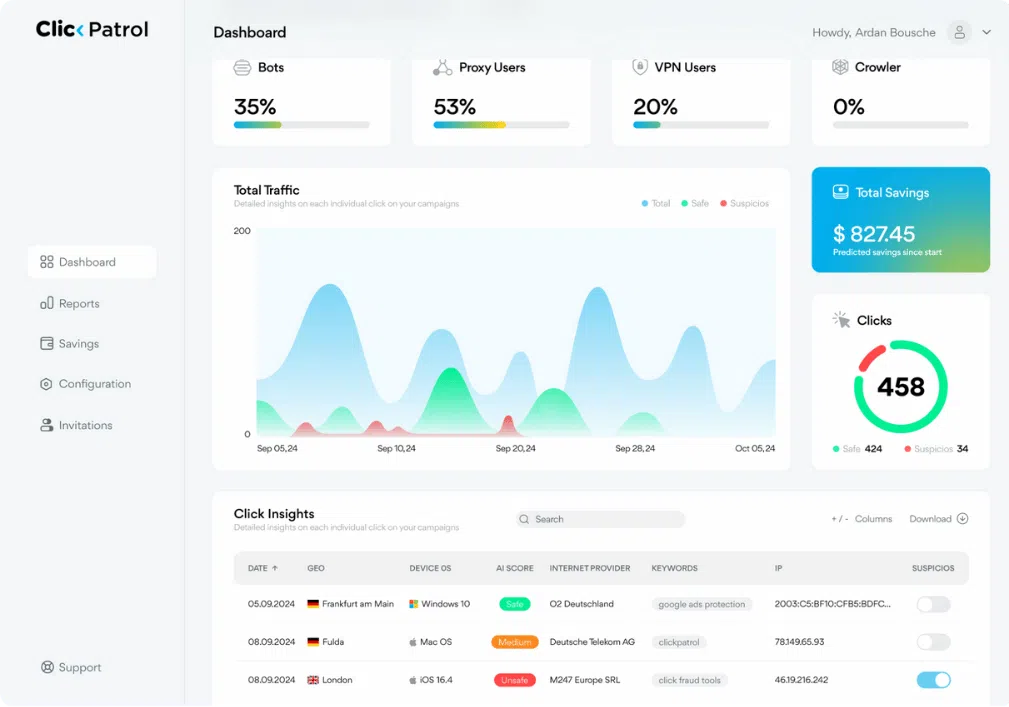
ClickPatrol's tag fires a legitimate or suspicious event on each ad visit, so Google Ads, Meta or Microsoft Ads can build one audience to exclude and one to retarget.
- Why lists fill up with bots
- The tag admits everyone. A bot that clicked your ad once stays in the list for the membership duration, sees your follow-up ads and can end up in a lookalike seed.
- What ClickPatrol does
- Two events, no exports. The tag in Google Tag Manager pushes ClickPatrol_Legitimate or ClickPatrol_Suspicious to the dataLayer. Platforms build audiences from them; nothing is uploaded or synced.
- Where it stops
- Ad traffic only. Organic, direct and email visitors get no label. Keep your base pixel on All Pages if you want them in your lists too.
- Where it works
- Six ad platforms. Google Ads through GA4 or a custom parameter, Meta, Microsoft Ads, LinkedIn, Pinterest and DV360. Google Ads also gets IP exclusions. Google Ads click fraud protection
- Price and trial
- From €71 a month, €59 billed yearly. A 7-day trial after a €0.01 card check; cancel within the week and pay nothing more. Compare plans
Platform by platform
How the verdict reaches each ad platform
The label is the same everywhere. What differs is how each platform lets you build an audience on it.
| Platform | How the verdict gets there | What you build |
|---|---|---|
| Google Ads, through GA4 | The ClickPatrol events go to GA4 as custom events. GA4 shares the audience with the linked Google Ads account, which can take up to 48 hours. | CP Legitimate and CP Suspicious in Audience manager. Each serves on Search, Display or YouTube from 100 active users. |
| Google Ads, without GA4 | A Google Ads Remarketing tag in GTM sends the verdict as the custom parameter clickpatrol_status. It becomes selectable 24 to 48 hours after publishing. | Website visitor segments filtered on that parameter, built straight in Google Ads. |
| Meta | Your Meta Pixel receives the ClickPatrol events through Google Tag Manager. | Website Custom Audiences: the legitimate one for targeting and lookalikes, the suspicious one as an ad set exclusion. |
| Microsoft Ads | A UET custom event carries the ClickPatrol event name as its action. | Remarketing lists for both groups. Microsoft serves a list from 300 users. |
| Campaign Manager has no filter for events, so the Insight Tag fires only on visits labelled legitimate. | Retargeting audiences that hold clean ad traffic only, from 300 members. | |
| Pinterest and DV360 | A Pinterest tag event fired from GTM; for DV360, a linked GA4 property or Floodlight. | A suspicious audience excluded per ad group on Pinterest, per line item in DV360. |
How it works
Label the visit, exclude one group, retarget the other
In that order. Exclusion is close to risk-free; targeting needs volume and time to learn, so it comes second.
1Label
Each ad visit is labelled before it joins a list
The ClickPatrol tag runs on All Pages in Google Tag Manager. When a visit comes from one of your ads, it scores device, network and behaviour and pushes one of two events. Later pages in the same visit get the same push, so a tag that waits for the legitimate event keeps firing after the landing page.
- Two core events: legitimate and suspicious
- Extra segments under Audience in the dashboard, such as device type or location
- Your remarketing tag reacts to the event, not to every page view
2Exclude
The suspicious group goes out first, at account level
Build CP Suspicious with a 30-day membership and add it as a negative audience in the Shared library, not campaign by campaign: a campaign you create next month is then protected without anyone remembering it. In a small account, especially B2B, try it on one campaign first and watch cost per lead and conversion rate for two to four weeks before you widen it.
- One exclusion that every new campaign inherits
- No lists to refresh by hand
- Audit active audiences each quarter; Google memberships run up to 540 days
3Retarget
The legitimate group becomes your seed
Stack the legitimate event on a conversion or on a page visit, for example "legitimate and viewed pricing", with an AND rule. On its own, "all legitimate visitors" is almost your whole ad traffic and too broad to target. A lookalike seed works best from 1,000 profiles and better from 5,000; use a rolling window so it refreshes monthly. Google retired Similar segments in August 2023, so in Google Ads the legitimate list becomes a Lookalike seed in Demand Gen or an audience signal elsewhere. On Meta, the same audience feeds a Lookalike; more in Meta ads click fraud protection.
- Combine with your own intent and CRM signals
- Keep five to seven active audiences per account at most
- Measure lift: same campaign with and without the exclusion
Results
Cleaner traffic in, cleaner lists out
Conservio sells conservation travel and advertises on Google Ads. The traffic it pays for got cleaner in its first month with ClickPatrol, and that traffic is what a remarketing list is built from.
 Travel
- 14%
- cleaner traffic
- 17%
- saved on campaigns
- €1,940
- saved in the first month
I manage ads for an e-commerce brand, and we were seeing strange spikes in clicks with zero conversions. After starting with ClickPatrol, the difference was immediate. Within two weeks, our ROAS improved and the fake traffic disappeared. The price easily pays for itself.
Get started
Two audiences in three steps
Connecting Google Ads takes about 2 minutes. The audiences need the ClickPatrol tag in Google Tag Manager and a day or two to fill.
Start and connect
Enter your work email and confirm your card with €0.01. Connect Google Ads with a Google login; other platforms get a UTM template on their ads.
Add the tag in Google Tag Manager
Install the ClickPatrol tag on All Pages with its event trigger, then forward the two events to GA4, your Meta Pixel or UET, depending on where you advertise.
Build CP Suspicious and CP Legitimate
Exclude the suspicious audience at account level and use the legitimate one for retargeting and seeds. Google needs 24 to 48 hours before a new segment shows up.
Reviews
From advertisers who check where their traffic comes from
4.974 reviews 5.018 reviews
 5.051 reviews4.523 reviews
Efficient Tool for Serious Advertisers!
“Gives full transparency into traffic sources. Detects bots, VPNs, and duplicate clicks. Easy to customize the blocking settings.”
Clean dashboard, real results
“I really like how simple and easy the interface is to use. There’s no clutter or confusing sections, so everything feels clear and straightforward. It also shows fraudulent clicks and how much money you’re saving in a very transparent way. I’d definitely recommend it to any digital marketing team.”
Reduced click fraud and saved ad budget with ClickPatrol
“ClickPatrol was incredibly easy to set up it started monitoring our ad campaigns within minutes. The dashboard is clean and gives a clear view of where clicks are coming from.”
Read at the source on 16 November 2026 for G2, 4 November 2026 for Capterra and SourceForge, and 11 August 2026 for Trustpilot. Read all customer reviews
Questions
Before you rebuild your audiences
Will excluding suspicious visitors make my audiences too small?
It only removes visitors ClickPatrol labelled suspicious. In a low-volume account, especially B2B, one exclusion can still shift what your campaigns learn, so start on a single campaign and widen it once the direction is clear. A Google audience needs 100 active users in 30 days before it serves on Search, Display or YouTube.
Do I have to upload or sync lists?
No. ClickPatrol fires an event on your own site and each platform builds the audience from it, through the tagging you already run. There is no CSV, no scheduled sync and no stale export. For a shop that retargets heavily, see click fraud protection for ecommerce.
Why not retarget the suspicious group as a test?
Remarketing works at cookie or ID level, where bots barely register as anyone you could win back. The suspicious audience has one job: a negative audience, set once at account level. Keep retargeting for the legitimate audience, combined with what the visitor did on your site.
How long until a new audience can serve?
Google shows a custom parameter 24 to 48 hours after it first receives it, and a GA4 audience can take up to 48 hours to reach Google Ads. It then needs 100 active users. Microsoft Ads and LinkedIn start serving from 300, so give a fresh list a few days.
Does this include visitors from organic search?
No. ClickPatrol labels visits from your ads, the ones carrying its tracking template or UTM parameters. Organic and direct visitors get no label. If your remarketing pixel only fires on the legitimate event, keep a second base pixel on All Pages for everyone else.
Retarget the visitors who were real
Start the trial, add the ClickPatrol tag to Google Tag Manager and build the two audiences where you advertise. If it is not for you, cancel within 7 days: the €0.01 check is all you pay.
Start your 7-day free trial
Done. We are opening your account.
Sent. Look in your inbox and create your account whenever it suits you.