
 English
 Nederlands
Google Ads click fraud protection Google catches some invalid clicks. You pay for the ones it misses.
Bots, competitors and click farms click your ads too. Google filters some of those clicks before billing. ClickPatrol scores every click and excludes the IP addresses behind the invalid ones in your own campaigns.
Done. We are opening your account.
Sent. Look in your inbox and create your account whenever it suits you.
Avis South Africa on Google Ads: cost per acquisition down 36%
 4.9
 4.5
Google Certified Click Tracker
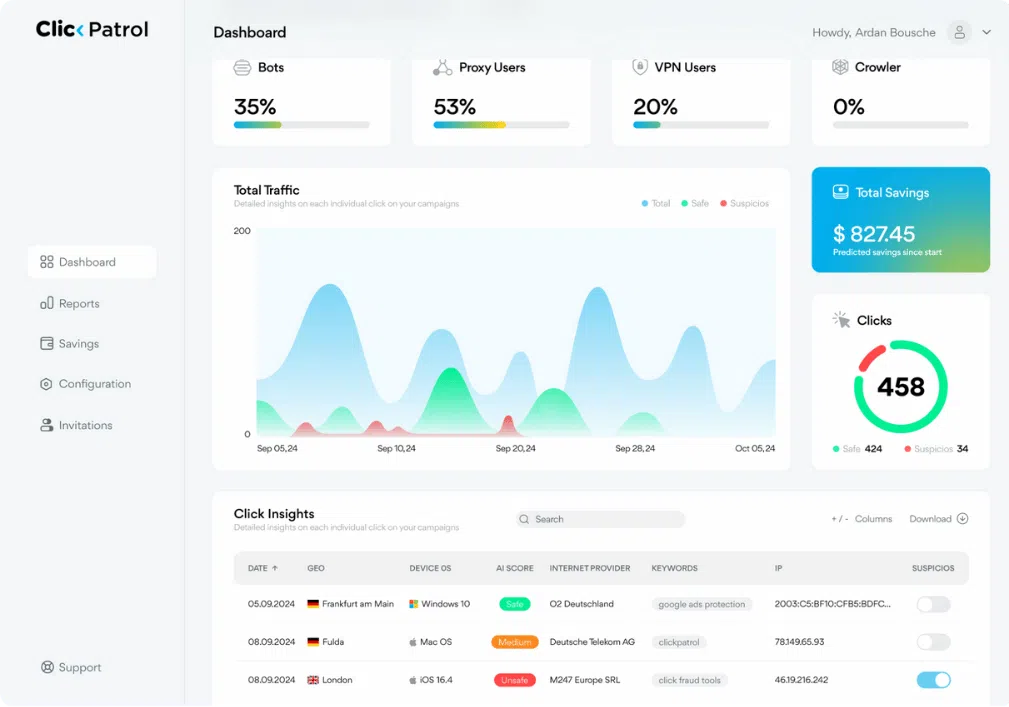
Google Ads click fraud and ClickPatrol, in short
ClickPatrol checks every click on your Search, Display and Performance Max campaigns and excludes the IP address behind each invalid one, so it cannot click your ads again.
- What Google does on its own
- Filters before billing. Google drops the invalid clicks it detects and counts them in the Invalid clicks column. Some it misses are credited later, on a following invoice.
- What ClickPatrol does
- Scores, then excludes. The tracking template checks each click on device, network and behaviour. An invalid source's IP address is excluded in that campaign, or account-wide for Performance Max.
- Where it stops
- Credits stay Google's call. ClickPatrol reports invalid clicks; Google reviews them, and about 5% of reported clicks come back after 4 to 8 weeks. Google Ads refunds
- Access it needs
- Standard or Admin access. On the Google Ads account or the manager account (MCC) above it, for the tracking template and IP exclusions. YouTube has its own page.
- Price and trial
- From €71 a month, €59 billed yearly. A 7-day trial after a €0.01 card check; cancel within the week and pay nothing more. Compare plans
Side by side
What Google already does, and what it leaves to you
Google's filter works before billing and only on what Google itself flags. Everything after that happens in your account, or not at all.
| Topic | Google Ads on its own | With ClickPatrol |
|---|---|---|
| Invalid clicks | Filtered before billing when Google's own systems detect them. | Every click is scored, including the ones Google lets through and bills. |
| What you see | A count per campaign in the Invalid clicks and Invalid click rate columns. | Each click in Click Insights, with its location, network and a verdict. |
| A source that clicks again | Google adds no IP exclusions to your account for you. | Its IP address is excluded in the campaign it hit, or across the account for Performance Max, so it stops seeing your ads. |
| Money back | Credits for invalid clicks it finds after billing, in a following billing cycle. They show up in your Google Ads billing as invalid activity. | Reports invalid clicks to Google for you. About 5% of reported clicks come back as a credit, after a review of 4 to 8 weeks. |
| Conversions | Every form fill counts, from a person or from a bot. | Count a conversion only when the visit was scored as real, so Smart Bidding learns from real enquiries. |
A credit pays back one click. An exclusion stops the next one from the same source, which is why ClickPatrol works on the source.
How it works
Inside your own Google Ads account
Your bids, keywords and ads stay as they are. ClickPatrol only touches the tracking template and the IP exclusions.
1Classify
Every click scored on its way to your site
When you connect, ClickPatrol places its tracking template at account level, or you paste it in yourself under Account settings. Each ad click then passes ClickPatrol on the way to your landing page. Offices, schools and mobile networks share IP addresses, so the verdict never rests on the address alone.
- Data centres, VPNs and proxies
- The same source clicking again and again
- Competitors who click your ads
2Exclude
The source loses sight of your ads
An invalid click puts its IP address on the exclusion list of the campaign it came through. Google allows 500 IP exclusions per campaign, so ClickPatrol keeps that list on the sources that are a risk now and lets old ones go. Performance Max has no campaign list, so there the exclusion applies to the whole account. Doing it by hand instead? This is how to exclude IP addresses in Google Ads.
- Your ads keep running for everyone else
- The exclusions are visible in your campaign settings
- Whitelist any IP under Configuration
3Train
Smart Bidding counts real enquiries only
Add the ClickPatrol legitimate event to the conversion you bid on, and Google Ads counts a form fill only when the visit was scored as real. Performance Max and target CPA then look for people like your customers. More on Smart Bidding protection.
- Set up through Google Tag Manager
- Remarketing lists without suspicious visitors
- The same event works in GA4
Results
What changed for Avis on Google Ads
Car rental across African markets, paid search, about three months with ClickPatrol.
 Brand
- +123%
- conversions
- +91%
- click-through rate
- −36%
- cost per acquisition
We were skeptical at first because we thought Google already filters out invalid clicks. Turns out they miss a LOT. ClickPatrol showed us exactly what was slipping through. After 3 months of use our lead quality is way up and we're spending less to get the same results. Can't imagine running ads without it now.
Get started
Connected in about 2 minutes
You need Standard or Admin access to the Google Ads account. Nothing changes in your campaigns until you switch protection on.
Enter your work email
Then verify your card with €0.01. The 7-day trial bills nothing else.
Sign in with Google
Pick the account, or your manager account and then the client account under it. ClickPatrol places the tracking template at account level.
Watch the first clicks
Scored clicks show up in Click Insights within a few hours of the first new ad click. Switch protection on when you have seen enough, and the exclusions start.
Reviews
From advertisers who run Google Ads
4.974 reviews 5.018 reviews
 5.051 reviews4.523 reviews
Wish I knew about click fraud earlier
“I run a small law firm and spend a fair amount on Google Ads. I had no idea how much of the budget was being wasted until a marketing consultant recommended ClickPatrol. Seeing the data was eye-opening. Our cost per acquisition has gone down significantly, and I finally feel like I’m getting proper value from my ad spend.”
Tried a few tools, this one's the best
“Switched from ClickCease after comparing both for a couple of months. ClickPatrol catches more and the interface is less cluttered. Also appreciate that it doesn't feel like they're trying to upsell you constantly. Fair pricing, good product.”
Protects Every Marketing Dollar!
“Real-time fraud detection and blocking. Improves lead quality by filtering fake sign-ups. Detailed analytics to optimize campaigns. Alerts notify suspicious activity immediately. Multi-platform integration. Helps reduce wasted ad spend and improves ROI.”
Read at the source on 16 November 2026 for G2, 4 November 2026 for Capterra and SourceForge, and 11 August 2026 for Trustpilot. Read all customer reviews
Questions
Before you connect Google Ads
Doesn't Google already refund invalid clicks?
Partly. Google filters the invalid clicks it detects before billing and credits some it finds later on a following invoice. Of the clicks ClickPatrol reports, about 5% come back as a credit, after a review of 4 to 8 weeks. A credit pays back one click; excluding the source stops the next one. More on Google Ads refunds.
Can ClickPatrol exclude a real customer?
ClickPatrol does not exclude on an IP address alone, because offices, schools and mobile networks share addresses. It weighs IP reputation, behaviour and device signals together. If a real customer is excluded anyway, add their IP to the whitelist under Configuration and they see your ads again.
Why does ClickPatrol show fewer clicks than Google Ads?
A small part of Google's Search Partner network does not support third-party tracking templates, which usually accounts for a 4 to 8% difference. Clicks on a call asset that never reach your website are not tracked either. The clicks ClickPatrol does see are the ones that reach your landing page.
I already use a tracking template. What now?
Merge the two. The free tracking template merger combines your template with the ClickPatrol one. Check the campaign, ad group and ad levels too: a template set there overrides the account level, and ClickPatrol is then skipped for those ads.
Can an agency connect client accounts?
Yes. Connect the manager account (MCC) with Standard or Admin access, then pick the client account below it. Read-only access is not enough, because ClickPatrol edits the tracking template and the IP exclusions. See ClickPatrol for agencies for the plan that covers many clients.
See what Google let through in your account
Connect Google Ads, let the trial score a week of clicks and put it next to the Invalid clicks column Google shows you. Cancel within 7 days and nothing more is charged.
Start your 7-day free trial
Done. We are opening your account.
Sent. Look in your inbox and create your account whenever it suits you.