
 English
 Nederlands
A burst of clicks from one network
Several clicks from the same internet provider, region or IP range in a short time is one of the clearest bot patterns. In ClickPatrol, the provider, location and IP columns of Click Insights show it on one screen.
ClickPatrol checks every Google Ads click for bot signals, from server networks to scripted visits and repeat clicking. Bot sources are excluded in the campaign they hit, so your budget reaches people.
Done. We are opening your account.
Sent. Look in your inbox and create your account whenever it suits you.
Agency daar-om.nl found up to 20% invalid clicks on some client accounts
 4.9
 4.5
Google Certified Click Tracker
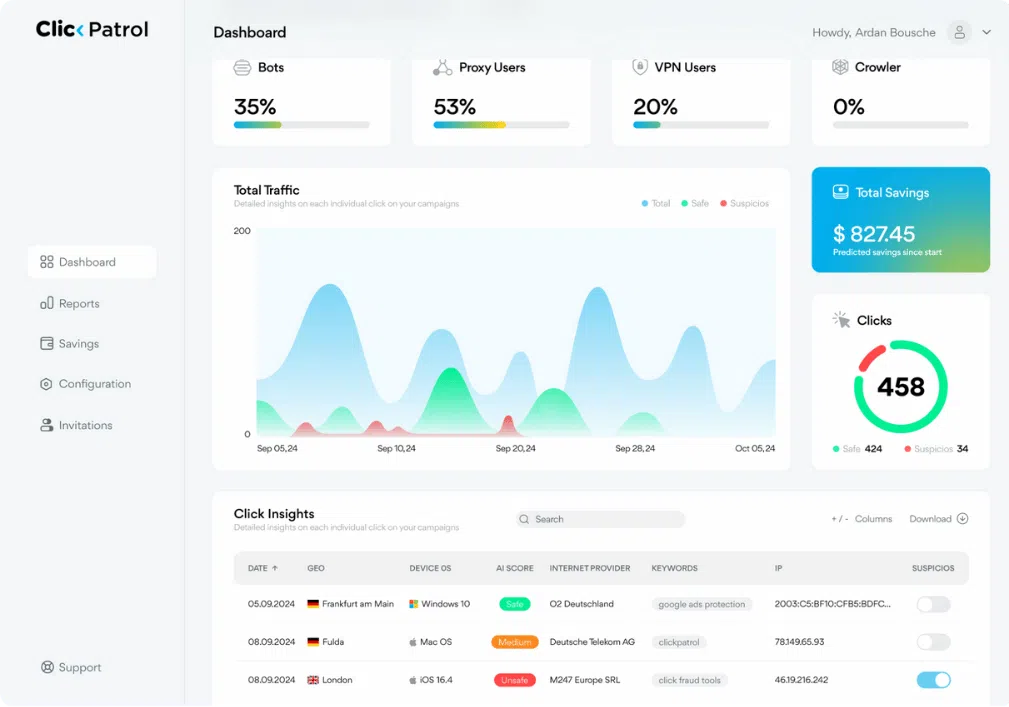
Each Google Ads click is checked for bot signals on its way to your landing page, and ClickPatrol excludes the IP address of every bot source it finds.
Signs
Five signs that point at bots, and one that usually means the problem is targeting. Check that one first, because it costs nothing to fix.
Several clicks from the same internet provider, region or IP range in a short time is one of the clearest bot patterns. In ClickPatrol, the provider, location and IP columns of Click Insights show it on one screen.
People shop from home, office and mobile connections. Server networks rarely hold a buyer. VPNs and proxies need more care, because some genuine visitors use them too.
Some bots skip the results page and call your tracking URL directly with a scraped click ID. Google often filters those before its reports; ClickPatrol flags them and excludes the IPs behind them.
Automated clicks gather on certain apps and websites. The Placements page shows the share of invalid clicks per placement, so you can switch the worst ones off. See our guide to bot protection for Display campaigns.
Bots that reach the landing page sometimes fill in the form as well. Those count as conversions, and Smart Bidding goes looking for more of the same. More on junk leads.
If the search terms report is full of loosely related queries, the clicks may well be human and simply off-target. That is a keyword and match-type fix. ClickPatrol will not turn badly targeted traffic into buyers.
How it works
ClickPatrol needs two things in your Google Ads account: the tracking template to see each click, and the IP exclusion list to act on it.
1Detect
Device, network and behaviour are checked as each click passes on its way to your landing page. A bot that changes IP address still leaves a device fingerprint and a click pattern behind, so the verdict never rests on the address. The full signal list is on our bot detection page.
2Exclude
The IP address of a bot source goes on the exclusion list of the campaign it clicked. You can add click threshold rules on top, such as blocking any IP that clicks 3 times in 10 minutes. Prefer to track bots down by hand? Our article on Google Ads bot accounts covers the manual route.
3Count
Add the ClickPatrol condition to your conversion trigger in Google Tag Manager, and a form fill counts only when the visit was scored as real. Smart Bidding then stops learning from bots. More on Smart Bidding protection.
Bots click Meta and Microsoft ads too. There, ClickPatrol labels each visit through its tag, and the suspicious audience you exclude in the platform keeps those bots from seeing your ads again.
Results
daar-om.nl runs online marketing for Dutch SMEs. A two-week demo on several Google Ads accounts showed how much of the traffic was not human.
 Agency
With ClickPatrol, we achieve better results for our customers, making them even more satisfied with our services. Efficiently excluding non-human traffic allows us to use their ad budgets more effectively.
Get started
You need Standard or Admin access to the Google Ads account. The trial only measures, so nothing in your campaigns changes yet.
Then a €0.01 card check. Nothing else is billed during the 7 days.
Sign in with Google and pick the account. ClickPatrol places the tracking template for you. Whitelist your own IP before you click your own ads.
Click Insights fills within a few hours of the first new ad click. Switch protection on and bot sources start being excluded.
Reviews
4.974 reviews 5.018 reviews
 5.051 reviews4.523 reviews
“I manage ads for an e-commerce brand, and we were seeing strange spikes in clicks with zero conversions. After starting with ClickPatrol, the difference was immediate. Within two weeks, our ROAS improved and the fake traffic disappeared. The price easily pays for itself.”
“Switched from ClickCease after comparing both for a couple of months. ClickPatrol catches more and the interface is less cluttered. Also appreciate that it doesn't feel like they're trying to upsell you constantly. Fair pricing, good product.”
“We were skeptical at first because we thought Google already filters out invalid clicks. Turns out they miss a LOT. ClickPatrol showed us exactly what was slipping through. After 3 months of use our lead quality is way up and we're spending less to get the same results. Can't imagine running ads without it now.”
Read at the source on 16 November 2026 for G2, 4 November 2026 for Capterra and SourceForge, and 11 August 2026 for Trustpilot. Read all customer reviews
Questions
There is no fixed share; it depends on your industry, targeting and campaign types. ClickPatrol customers save 9% of their ad budget on average, up to 21% in some industries, and daar-om.nl saw up to 20% invalid clicks on some accounts. The trial measures your own account before anything is excluded.
Google filters the invalid clicks its systems detect before billing. Bots it does not catch are billed like any other click, and only some come back later, as an invalid activity credit on a following invoice. Excluding the source stops the next click, which a credit cannot do. See Google Ads refunds.
No. ClickPatrol classifies visits that come from your ads, so organic and direct bot visits stay in your analytics. You can send the ClickPatrol events to GA4 to split ad traffic into legitimate and suspicious. For the rest, read our guide to filtering bot traffic in GA4.
Exclusions are never based on an IP address alone, because mobile networks and offices share addresses. You can also start in Monitor Only Mode, where every click is scored but nothing is sent to Google. A real customer who does end up excluded comes back through the whitelist.
Starter costs €71 a month for 5,000 protected clicks, or €59 a month billed yearly, excluding VAT. Whether that pays off depends on how many of your clicks are bots, which the trial shows. Cancel within 7 days and you pay nothing beyond the €0.01 card check. See ClickPatrol for small businesses.
Connect Google Ads and let the trial check every click for a week: server networks, scripted visits, repeat clickers. Then decide whether to switch protection on. Cancel within 7 days and nothing more is charged.
Done. We are opening your account.
Sent. Look in your inbox and create your account whenever it suits you.