Education click fraud protection Every enrolment click should come from someone who could enrol.

Course ads draw bots, click farms and competitors as well as students. ClickPatrol checks each paid click, keeps invalid sources out of your Google Ads campaigns and labels every enquiry before admissions opens it.

€0.01 card checkSet up in 2 minutesCancel within 7 days, nothing more to pay

Each email includes an unsubscribe link. Read our privacy policy.

Average saving across ClickPatrol customers: 9% of ad budget, up to 21% in some industries

G24.9 Trustpilot4.5 Google Certified Click Tracker
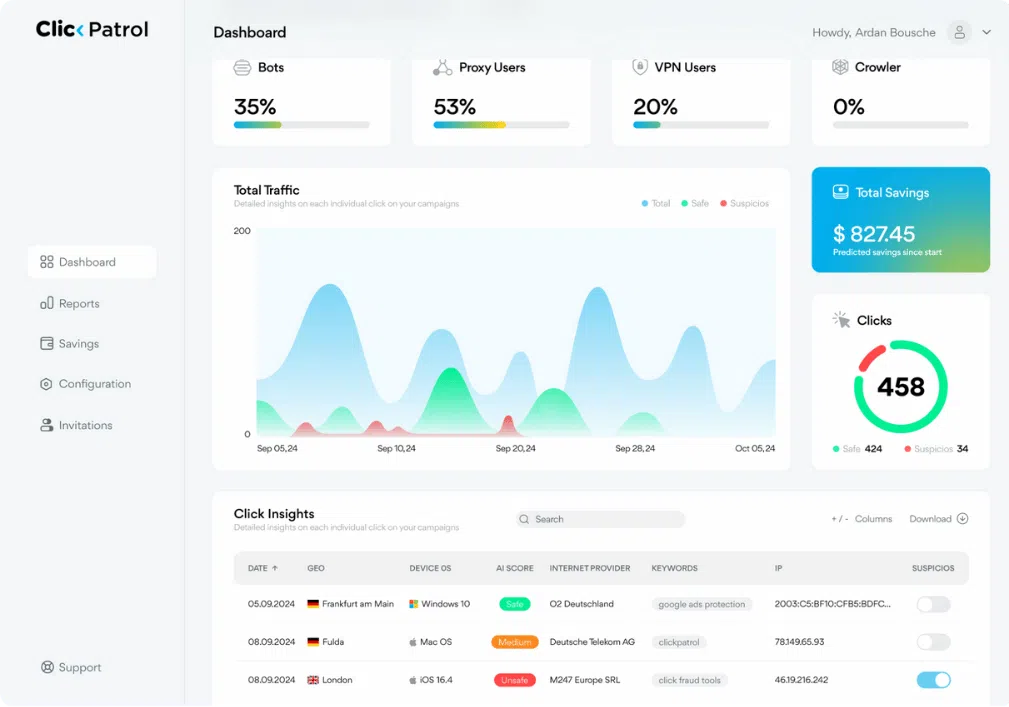
ClickPatrol dashboard with total traffic, safe and suspicious clicks, total savings and the Click Insights table

Education click fraud protection, in short

Course clicks get a verdict from ClickPatrol, invalid sources are excluded in Google Ads, and each enquiry reaches your admissions CRM labelled legitimate, suspicious or not classified.

What a click costs
€25 for “online mba”. That is the UK Google Ads average; “mba” runs at about €9 (DataForSEO, read 10 November 2026, converted from US dollars). Intake months carry the biggest budgets.
What ClickPatrol does
Scores, excludes, labels. Invalid IPs join the campaign’s exclusions on Search and Display, the account-wide list on Performance Max. A hidden form field carries the verdict into your admissions CRM.
Where it stops
A 24-hour window. The verdict stays with a visit for 24 hours, in that browser. An application days later, with no new ad click, arrives as not classified.
Meta, Microsoft Ads and LinkedIn
Kept out through audiences. You exclude the suspicious audience on Meta and Microsoft Ads; on LinkedIn the Insight Tag fires only on legitimate visits.
Price and trial
From €71 a month, €59 billed yearly. A 7-day trial after a €0.01 card check; cancel within the week and pay nothing more. Compare plans

In a student recruitment account

What makes student traffic harder to judge

Each one is a reason ClickPatrol looks well past the IP address.

Campus and school networks

Hundreds of students can reach your ads from one university or school IP address. A shared address is not a reason to exclude in itself, so ClickPatrol weighs device, network and behaviour on every click. Should a campus address you rely on land on the list, whitelist it, or the whole range with a wildcard such as 198.51.100.*.

Recruiting abroad

In some countries many people can only get online through a VPN. ClickPatrol’s VPN setting is left to the algorithm by default, so a VPN counts against a click without deciding it; keep the hard block off where you recruit. Per country, Reports shows how many clicks were safe and how many invalid.

Decisions that take weeks

A verdict stays with a visit for 24 hours, in that browser. Apply days later, without clicking an ad again, and the record reads not classified: no verdict, rather than a bad one. Your original conversion keeps counting it as before.

How it works

From course ad to admissions record

Courses, keywords, bids and landing pages stay as you set them. Click fraud protection only works on the clicks they bring in.

1Classify

Scored before the prospectus request

Google Ads clicks pass the tracking template. Meta, Microsoft Ads and LinkedIn visits carry UTM templates to the ClickPatrol tag in Google Tag Manager. Each visit then gets a legitimate or suspicious verdict built from device, network, behaviour and click pattern.

  • Hosting networks and data centres
  • Repeat clicks on degree and course keywords
  • Clicks from countries you never recruit in

2Exclude

Invalid sources stop reaching your course ads

In Google Ads, the IP address behind an invalid click goes on that campaign’s exclusion list, which ClickPatrol keeps within Google’s limit of 500 addresses. Performance Max campaigns get the exclusion at account level instead. On Meta, the suspicious audience becomes an exclusion in your ad sets.

  • Students elsewhere keep seeing your ads
  • Whitelist a campus range with a wildcard
  • Keep one programme unprotected as a control

3Label

Admissions sees which enquiries were real

Map the verdict to a hidden field on your enquiry or application form and it lands on the CRM record as legitimate, suspicious or not classified. Put the same condition on a copy of your conversion trigger, attached to a second conversion action, and Smart Bidding can learn from enquiries that followed a legitimate visit. More on junk leads.

  • Salesforce, HubSpot, Dynamics: any CRM fed by a form
  • Suspicious enquiries out of conversion uploads
  • Your existing conversion keeps counting

Get started

Running before the next intake

To begin you only need Standard or Admin rights on Google Ads. Labelling enquiries can wait until after the first week; it needs someone with access to your Tag Manager container.

  1. Register with your work email

    A €0.01 card check comes next. Nothing else is billed during the 7 days.

  2. Link the Google Ads account

    Sign in with Google and pick it, or find it under your manager account. The ClickPatrol template is written into the account settings, which takes about 2 minutes.

  3. Read the first week

    Reports shows safe and invalid clicks per campaign, keyword and country. Switch protection on once you have seen enough.

Reviews

Advertisers on the clicks they stopped paying for

G24.974 reviews
Capterra5.018 reviews
SourceForge5.051 reviews
Trustpilot4.523 reviews
★★★★★

No-brainer if you run Google Ads

“We were skeptical at first because we thought Google already filters out invalid clicks. Turns out they miss a LOT. ClickPatrol showed us exactly what was slipping through. After 3 months of use our lead quality is way up and we're spending less to get the same results. Can't imagine running ads without it now.”

Finley DeanGoogle Ads advertiserTrustpilot
★★★★★

Great Protection and Excellent Support

“Customer support is friendly and responsive. Setup was simple, and the reports are visually excellent. Real-time protection runs smoothly.”

Craig T.Senior Marketing & Tech ExpertSourceForge
★★★★★

Wish I knew about click fraud earlier

“I run a small law firm and spend a fair amount on Google Ads. I had no idea how much of the budget was being wasted until a marketing consultant recommended ClickPatrol. Seeing the data was eye-opening. Our cost per acquisition has gone down significantly, and I finally feel like I’m getting proper value from my ad spend.”

Tom WaltersOwner, small law firmTrustpilot

Read at the source on 16 November 2026 for G2, 4 November 2026 for Capterra and SourceForge, and 11 August 2026 for Trustpilot. Read all customer reviews

Questions

Questions from admissions and marketing teams

Will an applicant who clicks our ad twice be excluded?

Not for clicking twice. Comparing courses means coming back to the same ad, and ClickPatrol weighs repeat clicks together with device, network and behaviour. If you add a click threshold rule, start generous, for example five clicks in one day, and tighten it only when Reports shows one address clicking far more than a person would.

Our admissions team works in Salesforce. Does the label reach it?

Yes, through Web-to-Lead. Create a custom text field on the Lead object, include it in the generated form and set that input to hidden. A Google Tag Manager tag then fills it with legitimate, suspicious or not classified. The form has to sit on the page itself, because the tag cannot reach a field inside an iframe.

Each faculty has its own website. How does that work?

Every website gets its own ClickPatrol UID, installed in that site’s Google Tag Manager container and tied to one Google Ads account. Link the accounts through your manager account (MCC). With many sites or brands, or above 100,000 clicks a month, the Agency and multi-brand plan is quoted after a demo.

Do we need to mention ClickPatrol in our privacy notice?

It is not strictly required, but ClickPatrol recommends it. The help docs offer sample wording that names the fraud check and the data it handles, such as IP address and browser details. Treat it as an example, not legal advice, and check it with your data protection officer. Processing happens in the EEA under GDPR.

Most of our enquiries come from Meta. Is there anything to protect?

Yes, with a different action than in Google Ads. Each Meta visit that carries the UTM template is scored, and the verdict reaches your Pixel as an event. A Custom Audience built from the suspicious event becomes an exclusion in your ad sets, and the lead event can fire after legitimate visits only. See Meta Ads click fraud.

See what your course ads paid for last week

Link your Google Ads account, give the trial a week of course clicks to score by campaign, keyword and country, then add the hidden field to see which enquiries were real. No address is excluded before you say so, and a cancellation within the 7 days ends it with nothing more to pay.

Start your 7-day free trial

€0.01 card checkSet up in 2 minutesCancel within 7 days, nothing more to pay

Each email includes an unsubscribe link. Read our privacy policy.