
 English
 Nederlands
A spam enquiry that counts as a win
Google Ads records the filled-in contact form as a conversion and starts looking for more visitors like it. You only find out when the phone number leads nowhere. The wider pattern is on the page about junk leads.
Law firms, clinics, installers and consultants pay a lot per click and close a few enquiries a week. ClickPatrol excludes the bots and repeat clickers, and marks which enquiries followed a real visit.
Done. We are opening your account.
Sent. Look in your inbox and create your account whenever it suits you.
A sales team handling dozens of leads a day? See ClickPatrol for lead generation
 4.9
 4.5
Google Certified Click Tracker
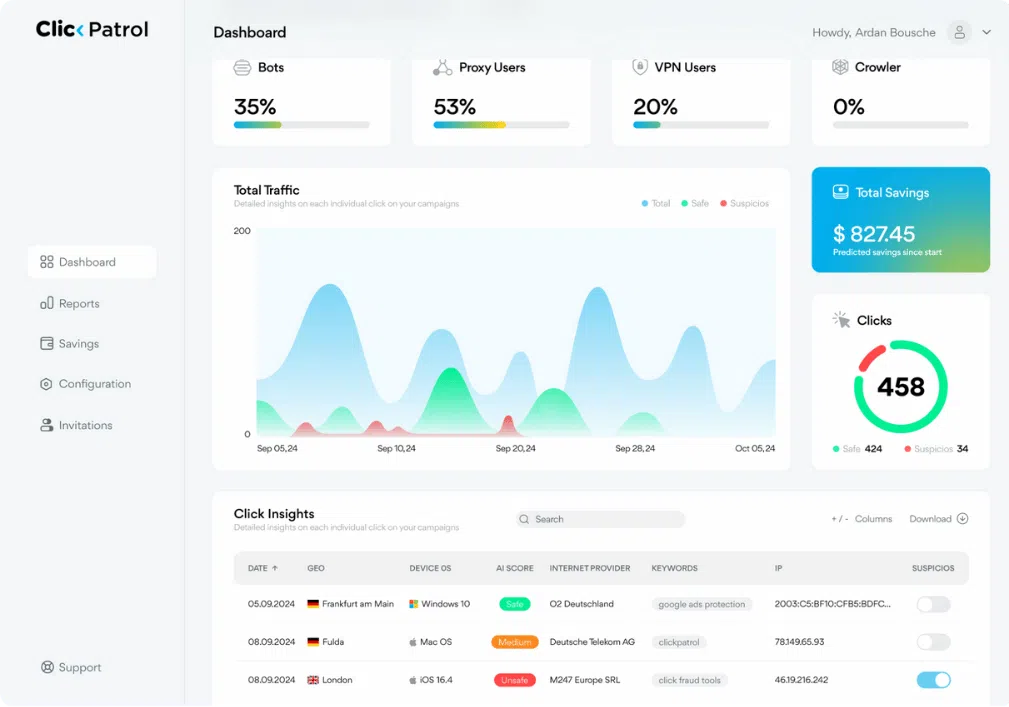
On your Google Ads, ClickPatrol scores every click, excludes the sources of invalid ones and shows which enquiries in your inbox followed a legitimate visit.
The problem
On a service keyword, every click costs real money and very few turn into work. These four never do, and only three of them are fraud.
Google Ads records the filled-in contact form as a conversion and starts looking for more visitors like it. You only find out when the phone number leads nowhere. The wider pattern is on the page about junk leads.
Another firm in your area searches the same terms and clicks to see your rates. Each check is a paid click. How to tell and what to do: competitors clicking your ads.
Data centres and scripts click a costly service keyword as readily as a cheap one. In legal, medical and financial services that adds up fast, see high-CPC niches.
You, your staff and returning clients click the ad to find your number. That is not fraud. Whitelist the office address so it never counts against you or gets excluded.
How it works
The first step works as soon as Google Ads is connected. The second and third use one tag in Google Tag Manager.
1Exclude
When a click is scored as invalid, its IP address goes on the exclusion list in your Google Ads account. ClickPatrol weighs device, network and behaviour together, because offices and mobile networks share addresses. The click fraud protection runs without you opening a report.
2Mark
A small Tag Manager tag fills a hidden field in your contact form with the ClickPatrol verdict just before the form is sent. The value travels with the enquiry, so it lands in your inbox or CRM next to the name and the question.
3Count
Give your conversion tag a second trigger that only fires when the visit was scored as legitimate. Bid on that conversion, and Google Ads looks for people like your clients instead of for whoever fills in forms most often.
Reviews
4.974 reviews 5.018 reviews
 5.051 reviews4.523 reviews
“I run a small law firm and spend a fair amount on Google Ads. I had no idea how much of the budget was being wasted until a marketing consultant recommended ClickPatrol. Seeing the data was eye-opening. Our cost per acquisition has gone down significantly, and I finally feel like I’m getting proper value from my ad spend.”
“I really like how simple and easy the interface is to use. There’s no clutter or confusing sections, so everything feels clear and straightforward. It also shows fraudulent clicks and how much money you’re saving in a very transparent way. I’d definitely recommend it to any digital marketing team.”
“Switched from ClickCease after comparing both for a couple of months. ClickPatrol catches more and the interface is less cluttered. Also appreciate that it doesn't feel like they're trying to upsell you constantly. Fair pricing, good product.”
Read at the source on 16 November 2026 for G2, 4 November 2026 for Capterra and SourceForge, and 11 August 2026 for Trustpilot. Read all customer reviews
The offer
One plan per firm, no setup fee, no contract and no sales call. The trial shows your own numbers before you pay anything.
Traffic Security Starter
One firm, one Google Ads account.
€71 / month
Traffic Security PRO
Several offices or a larger ad budget.
€83 / month
Cancel within the 7 days and nothing more is charged. Your ads keep running either way. Compare all plans
Get started
You need your work email and access to the Google Ads account. The enquiry verdict also needs Google Tag Manager on your site.
Enter your work email and verify your card with €0.01. The 7 days cost nothing more.
Sign in with Google and ClickPatrol places the tracking template, in about 2 minutes. Then whitelist your office IP under Configuration.
Install the ClickPatrol tag in Google Tag Manager and add a hidden field to your contact form. Send a test enquiry to check the verdict arrives.
Questions
That is where it counts most, because every wasted click comes out of a small number of chances. Starter costs €71 a month for 5,000 protected clicks. ClickPatrol customers save 9% of their ad budget on average, and the 7-day trial shows what your own account loses before you pay.
Not calls from a call button in the ad. Those go straight to your phone without a visit to your site, so Google bills the click and ClickPatrol never sees it. When someone visits your site first and calls from there, the visit before the call is scored.
Whitelist your office IP and anyone who should always see your ads. ClickPatrol never excludes on an IP address alone, and when you send conversions to ClickPatrol, a client who converted counts as a strong sign of a genuine visitor when they come back.
No. ClickPatrol classifies visits from your ads only. Spam from organic visitors or bots that find your form directly gets no verdict, so keep the spam filter or captcha on your form. What ClickPatrol adds is a verdict on the enquiries you paid for.
Yes, through a hidden field in your contact form that the ClickPatrol tag in Google Tag Manager fills in. It needs the official GTM tag: the ClickPatrol WordPress plugin does not write the value the field reads. The form also has to sit on your page, not inside an iframe.
Most service businesses advertise in one area. How invalid out-of-area clicks are spotted.
See regional campaignsPlumbers, locksmiths, roofers and restoration firms: what an urgent click costs and what to fix in Google Ads.
Read the guide for tradesRunning local campaigns on Facebook as well? How flagged visitors stay out of your Facebook audiences.
How it works on FacebookStart the trial, connect Google Ads and look at the clicks behind your enquiries. Cancel within 7 days and nothing more is charged.
Done. We are opening your account.
Sent. Look in your inbox and create your account whenever it suits you.