
 English
 Nederlands
Regional click fraud protection for companies that serve one area Your ads target one region. Not every click comes from it.
Some clicks from outside your area are a Google setting, some are VPNs and data centres, and some are a rival nearby. ClickPatrol shows which is which and excludes the invalid sources.
Done. We are opening your account.
Sent. Look in your inbox and create your account whenever it suits you.
 4.9
 4.5
Google Certified Click Tracker
ClickPatrol for regional companies, in short
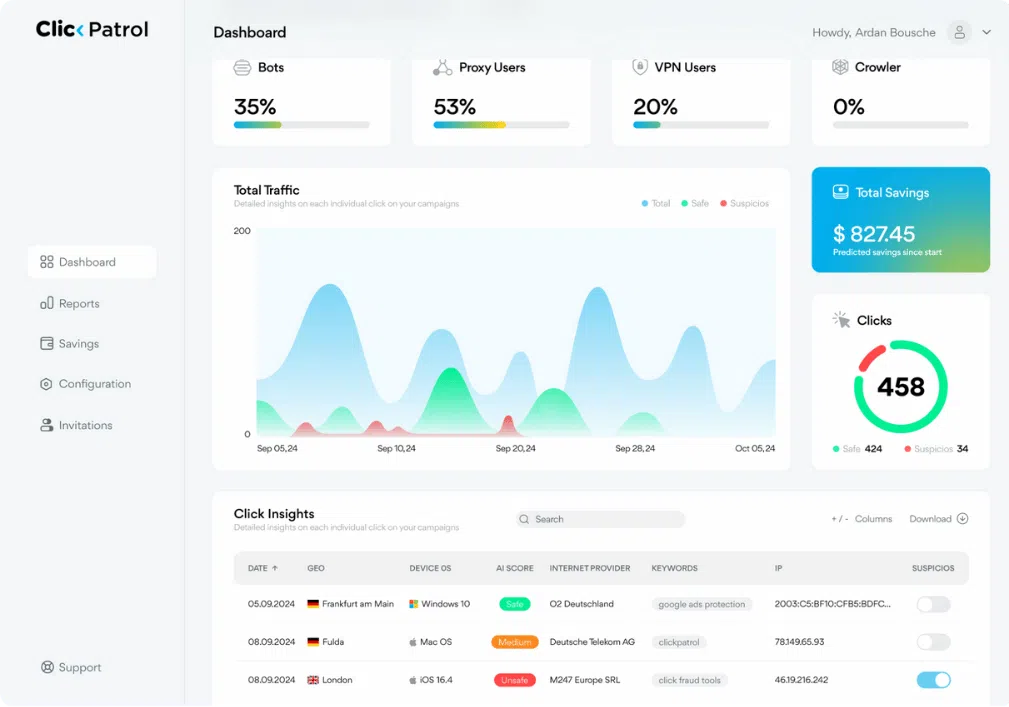
ClickPatrol shows where your Google Ads clicks come from, split into safe and invalid per region, and excludes the invalid sources without blocking anyone for location alone.
- Clicks from outside your area
- Not all of them are fraud. Google's default, Presence or interest, also reaches people elsewhere who showed interest in your area. The rest is mostly VPNs, data centres and travellers.
- What ClickPatrol does
- Maps and excludes. The Location report splits your clicks by country and region into safe and invalid, and the sources of invalid clicks are excluded in Google Ads.
- Where it stops
- No blocking by location. Where your ads show is set by location targeting in Google Ads. ClickPatrol never excludes a visitor just for being outside your area.
- A rival nearby
- Inside your own area. Location settings never catch a local competitor. A click threshold, such as 2 clicks in an hour, and your own blacklist do. Competitors clicking your ads
- Price and trial
- From €71 a month, €59 billed yearly. A 7-day trial after a €0.01 card check; cancel within the week and pay nothing more. Compare plans
Clicks from outside your area
Four causes, and only two of them are worth blocking
Before anything is excluded, it helps to know which of these you are looking at.
| Cause | What it looks like | What to do |
|---|---|---|
| Google's default location option | Campaigns are set to Presence or interest, which also reaches people elsewhere who have shown interest in your area. | Your setting, not fraud. Switch the campaign to Presence under location options if you only want people in the area. |
| VPNs, proxies and data centres | A region you never targeted, or a hosting network in the ISP list. Some look local because the exit sits nearby. | ClickPatrol scores these on device, network and behaviour and excludes the invalid sources in Google Ads. |
| Real people passing through | A phone on a mobile network outside the area, normal behaviour, sometimes an enquiry. | Leave them. ClickPatrol does not exclude anyone for location alone. |
| A rival inside your area | Local, so location settings never catch it. Repeat clicks on the same keywords and no enquiries. | Set a click threshold, blacklist an address you know, and read competitors clicking your ads. |
Location options as described in Google Ads Help, "About advanced location options" (read 10 November 2026). Presence or interest is Google's default for the locations you target.
How it works
See the map, then let ClickPatrol act on it
Your targeting, keywords and bids stay yours. ClickPatrol adds a tracking template, IP exclusions and the rules you set.
1Locate
Every click placed on the map, with a verdict
The Location report lists the countries and regions your clicks came from, split into safe and invalid. Clicks from regions you never targeted, at a high invalid share, point at VPNs, proxies and data centres rather than customers.
- Countries and regions per period
- ISP list to spot hosting networks
- Click Insights for the clicks behind each row
2Exclude
Invalid sources stop seeing your ads
A source scored as invalid goes on the exclusion list in your Google Ads account. ClickPatrol keeps that list on the addresses that are a risk now and lets old ones go, so it stays within Google's limit of 500 per campaign. The click fraud protection runs while you get on with the business.
- Never on an IP address alone
- Monitor only mode if you want to watch first
- Invalid clicks reported to Google
3Decide
Your own rules for your own area
Set how often one address may click before it is blocked, add an address you know belongs to a rival, and whitelist your shop, your staff and regular customers. The VPN and proxy rules stay on Algorithm unless your customers really never use one.
- Up to 5 click threshold rules
- A blacklist that wins until you whitelist
- Wildcards for an office range
Reviews
From owners who watch their own budget
4.974 reviews 5.018 reviews
 5.051 reviews4.523 reviews
Secured Our Digital Growth by Eliminating 30% Wasted Ad Spend
Read the full review on G2“As both founder and sales director, ClickPatrol has been crucial for protecting our marketing budget while scaling our spice blends business. The platform's real-time fraud detection immediately identified suspicious click patterns from regions where we...”
Wish I knew about click fraud earlier
“I run a small law firm and spend a fair amount on Google Ads. I had no idea how much of the budget was being wasted until a marketing consultant recommended ClickPatrol. Seeing the data was eye-opening. Our cost per acquisition has gone down significantly, and I finally feel like I’m getting proper value from my ad spend.”
Clean dashboard, real results
“I really like how simple and easy the interface is to use. There’s no clutter or confusing sections, so everything feels clear and straightforward. It also shows fraudulent clicks and how much money you’re saving in a very transparent way. I’d definitely recommend it to any digital marketing team.”
Read at the source on 16 November 2026 for G2, 4 November 2026 for Capterra and SourceForge, and 11 August 2026 for Trustpilot. Read all customer reviews
The offer
Built for a regional budget
No setup fee, no contract, no sales call. See your own regions in the trial before you pay.
Traffic Security Starter
€71 / month
- Every click scored on its way to your site
- Invalid sources excluded in your Google Ads account
- Location, device and network reports
- Click threshold rules, blacklist and whitelist
- Invalid clicks reported to Google
- Unlimited ad platforms for one brand
Cancel within 7 days, nothing more to pay
The €0.01 card check is the only charge in the trial. Stop, and your ads run on as before.
More than 5,000 clicks a month, or several branches? PRO starts at €83 a month. Compare all plans
Get started
Your regions on screen in about 2 minutes
You need your work email and access to the Google Ads account. Nothing changes in your campaigns until you switch protection on.
Start the trial
Enter your work email and verify your card with €0.01. Nothing else is billed in the 7 days.
Connect Google Ads
Sign in with Google and ClickPatrol places the tracking template. Whitelist your shop or office IP under Configuration.
Open the Location report
Compare the regions with your target area, check your location option in Google Ads, then switch protection on.
Questions
Questions from regional businesses
Can ClickPatrol block every click from outside my region?
No, and it should not. Where your ads show is set by location targeting in Google Ads. ClickPatrol excludes sources that score as invalid, wherever they are. A real person outside your area is left alone; a data centre inside it is not.
Why do I get clicks from outside my target area at all?
Often because of Google's default location option, Presence or interest, which also reaches people elsewhere who showed interest in your area. Switch to Presence if you only want people who are there. The rest is mostly VPNs, proxies, data centres and people travelling.
Should I switch on Block all VPN traffic?
Usually not. Leave the VPN and proxy rules on Algorithm, which judges each click on many signals instead of a blanket block. A hard rule also stops real customers who happen to browse through a VPN.
A business down the road keeps clicking my ads. What can I do?
Set a click threshold, for example 2 clicks in an hour, so a repeat address is blocked automatically. If you know an address, add it to the blacklist; it stays blocked until you whitelist it. More on competitors clicking your ads.
Is it worth it on a small regional budget?
Starter costs €71 a month for 5,000 protected clicks. ClickPatrol customers save 9% of their ad budget on average, up to 21% in some industries, and the trial shows your own number per region before you pay. Cancel within 7 days and nothing more is charged.
Related pages for local advertisers
Service Providers
Plumbers, clinics and law firms run local lead-gen ads. Where the wasted spend in those campaigns goes.
Read the service providers pageMultinationals
Growing into more regions or countries? One login and one DPA for every market.
See the setup for multinationalsEducation & Edtech
Schools and course providers recruit in their own area too. Fewer junk enquiries, more real students.
Read the education pageWhich of your clicks really came from your area?
Start the trial, connect Google Ads and open the Location report. Cancel within 7 days and nothing more is charged.
Start your 7-day free trial
Done. We are opening your account.
Sent. Look in your inbox and create your account whenever it suits you.