
 English
 Nederlands
800+ data points checked on every paid click Click fraud protection for Google & Meta Ads
Bots, competitors and scrapers click your ads and never buy. ClickPatrol scores every click and shuts out the source, so your budget reaches real people. Customers save 9% of their ad budget on average.
Avis grew ad conversions by 123% after filtering invalid clicks
Done. We are opening your account.
Sent. Look in your inbox and create your account whenever it suits you.
 4.9
 4.5
Google Certified Click Tracker
What is click fraud protection?
Click fraud protection is software that finds the invalid clicks on your paid ads, from bots, click farms, competitors and scrapers, and shuts their source out.
- What counts as click fraud
- Paid clicks with no buyer. Google bills them like any other click, whoever sat behind them. What is click fraud
- What ClickPatrol does
- Scores, then shuts out. Every click is checked on 800+ data points. Google Ads sources are excluded in your account; on Meta, Microsoft Ads, TikTok, LinkedIn, Pinterest and DV360, through an audience.
- Where it stops
- The trial only measures. For 7 days you see each scored click and what the invalid ones cost. Nothing is blocked until you switch protection on with Starter or PRO.
- What it saves
- 9% of ad budget, on average. Up to 21% in some industries. Comparing tools on method, coverage and price? Seven click fraud protection tools compared
- Price and trial
- From €71 a month, €59 billed yearly. A 7-day trial after a €0.01 card check; cancel within the week and pay nothing more. Compare plans
Every ad channel
Click fraud protection across every channel you pay for
One tag in Google Tag Manager covers every platform. Google Ads gets exclusions in the account; the other platforms get audience exclusions. Affiliate and other paid traffic can be scored through custom links.
Google Ads
Search, Display and Performance Max. The sources of invalid clicks are excluded in your account, so they cannot click again.
Meta Ads
Facebook and Instagram. Suspicious visitors go into an audience you exclude from your ad sets, and retargeting stays clean.
Microsoft Ads
Audience exclusions plus an IP export, so the same invalid traffic that hits Google Ads stays out of Bing too.
TikTok Ads
Taps are scored through the ClickPatrol tag. Suspicious visitors are excluded through an audience and kept out of retargeting.
LinkedIn Ads
Protect high-CPC B2B campaigns. Retargeting audiences are built only from visitors scored as legitimate.
Pinterest and DV360
The same audience exclusions for Pinterest ads and programmatic campaigns in Display & Video 360.
How it works
How ClickPatrol click fraud protection works
Score the click, shut out the source, keep your data clean. You do not need to change a single campaign.
1Classify
Every click scored on more than 800 data points
Device, network and behaviour are checked together, from obvious bots to fraud built to look human. A shared office or mobile IP never gets a customer blocked on its own.
- Bots, VPNs, proxies and data centres
- Competitors and scrapers who click your ads
- Click farms and sophisticated fraud
2Protect
The source is excluded where you advertise
Once a click is flagged, ClickPatrol excludes its source in Google Ads, so it cannot click again. How that works per campaign: Google Ads click fraud protection. On the other platforms suspicious visitors go into an audience you exclude.
- Exclusions sent to Google Ads automatically
- Invalid clicks reported to Google, credits show up in your billing
- Your own click threshold rules for repeat clickers
3Train
Bidding and retargeting learn from real people
With the ClickPatrol tag in Google Tag Manager, your conversion pixel fires only for visitors classified as legitimate. Smart Bidding and Meta then optimise towards real buyers.
- Clean conversion data for Smart Bidding
- Remarketing and lookalike audiences without bots
- Form spam kept out of the conversions you optimise on
The difference
What changes when you turn on click fraud protection
| Topic | Without ClickPatrol | With ClickPatrol |
|---|---|---|
| Budget | Bots, competitors and scrapers quietly use up the daily budget. | More of every euro reaches real, in-market prospects. |
| Bidding | Smart Bidding learns from invalid clicks and buys more of them. | Smart Bidding gets cleaner signals from real conversions. |
| Competitors | Rivals click your ads to push you off your best keywords. | Competitor and repeat clicks are blocked automatically. |
| Leads | Junk leads and fake form fills take up your sales team's time. | Sales spends time on real leads, not bot form fills. |
| Audiences | Remarketing lists fill with visitors who will never convert. | Remarketing audiences are built from genuine visitors only. |
Get started
Set up click fraud protection in 2 minutes
No code, no developer and no changes to your campaigns.
Start your free trial
Enter your work email and verify your card with €0.01. Nothing is billed during the 7 days.
Connect your ad accounts
Connect Google Ads in a few clicks; ClickPatrol places the tracking template. Meta, Microsoft Ads, TikTok, LinkedIn, Pinterest and DV360 connect through Google Tag Manager.
See the fraud, then protect
Every click is scored from the start. Switch protection on with Starter or PRO and invalid sources are excluded around the clock.
Best practices
Click fraud prevention best practices
How do you prevent click fraud? Block invalid sources, and keep the data those clicks leave behind out of your bidding and remarketing. One without the other keeps costing money: a blocked IP still sits in your audiences, and a fake conversion still teaches Smart Bidding to buy more of the same.
- Monitor the patterns that give fraud away.
High CTR with flat conversions, sudden click spikes, instant bounces and repeat visits from one IP range are the earliest warning signs. Check them weekly at minimum.
- Use IP exclusions, and know where they stop.
Manual exclusion lists in Google Ads block repeat offenders, but bots rotate through VPNs and residential proxies faster than any list is maintained, and Google allows up to 500 IP exclusions per campaign. Our step-by-step IP exclusion guide covers the setup.
- Do not treat frequency capping as click fraud protection.
Google Ads only caps impressions on Display and Video, and a bot that resets cookies never hits the limit. Frequency capping in Google Ads shows where the setting lives and what it misses.
- Tighten geo-targeting.
Serve ads only where you can actually sell, and exclude regions that send clicks but never customers.
- Guard your conversion data.
Smart Bidding trains on every conversion it receives. Filter bot conversions out before they reach the algorithm, or it optimises toward the fraud instead of away from it.
- Keep remarketing audiences clean.
Bots that click once get remarketed to for months. Filtering them out of your audiences stops the second wave of wasted spend.
- Audit campaigns on a schedule.
Review placements, search terms and traffic sources, and compare CTR against conversion rate per source. Discrepancies point at invalid traffic and at budget you can reclaim.
- Automate the block.
Protection software like ClickPatrol scores every click on more than 800 data points and sends the exclusion to your account, which is the part no manual routine can match.
Your number
What does click fraud cost you?
Enter your monthly ad spend. The calculator uses the 9% average saving of ClickPatrol customers.
Add up Google Ads, Meta and every other platform you pay for.
9% per month
€135
Per day
€4.44
Per year
€1,620
ClickPatrol starts at €71 a month. At this budget, the average saving is higher than that.
Every day you wait, an average of €4.44 stays on the table.
9% is the average saving across ClickPatrol customers, up to 21% in some industries. It is an average, not a promise; the trial shows your own number.
Results
Results from advertisers using ClickPatrol
A car rental brand and a travel company, both on Google Ads.


Reviews
What advertisers say about the protection
4.974 reviews 5.018 reviews
 5.051 reviews4.523 reviews
Efficient Tool for Serious Advertisers!
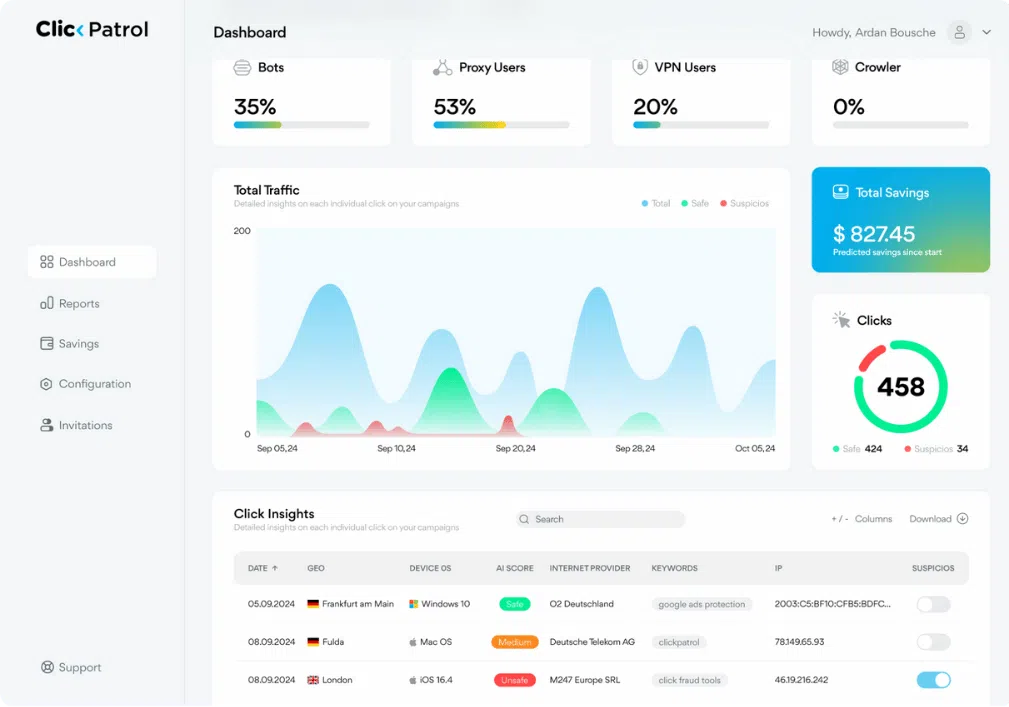
“Gives full transparency into traffic sources. Detects bots, VPNs, and duplicate clicks. Easy to customize the blocking settings.”
Clean dashboard, real results
“I really like how simple and easy the interface is to use. There’s no clutter or confusing sections, so everything feels clear and straightforward. It also shows fraudulent clicks and how much money you’re saving in a very transparent way. I’d definitely recommend it to any digital marketing team.”
Reduced click fraud and saved ad budget with ClickPatrol
“ClickPatrol was incredibly easy to set up it started monitoring our ad campaigns within minutes. The dashboard is clean and gives a clear view of where clicks are coming from.”
Read at the source on 16 November 2026 for G2, 4 November 2026 for Capterra and SourceForge, and 11 August 2026 for Trustpilot. Read all customer reviews
Security and privacy
GDPR and CCPA compliant. Built in the Netherlands.
Your click data is hosted in the EEA and handled under a DPA. See security and privacy for the details.
Questions
Frequently asked questions
How does ClickPatrol detect and block click fraud?
ClickPatrol scores every click on more than 800 data points, from device and network to behaviour, and spots bots, competitor clicks, scrapers and other non-human traffic. Once a source is flagged, it is excluded in your Google Ads account so it cannot click again. On Meta and the other platforms, suspicious visitors are excluded through an audience.
How long does it take to set up ClickPatrol?
About 2 minutes. Create your account, connect Google Ads and ClickPatrol places the tracking template for you. Meta, Microsoft Ads, TikTok, LinkedIn, Pinterest and DV360 connect through the ClickPatrol tag in Google Tag Manager. There is no code to write and nothing changes in your campaigns.
Does the trial block clicks right away?
No. The 7-day trial monitors your campaigns, so you see how much invalid traffic reaches your ads and what it costs. Blocking starts when you switch protection on with Starter or PRO. A card is needed for a one-time €0.01 check; nothing is billed during the trial.
What is the best way to protect my ads from click fraud?
Combine blocking with clean data. Exclude invalid sources as they appear, and keep their clicks out of your conversions and remarketing lists, so Smart Bidding learns from real customers. Doing one without the other keeps costing money; the best practices above cover both halves.
Which ad platforms does ClickPatrol protect?
Google Ads (Search, Display and Performance Max) with exclusions in the account. Meta, Microsoft Ads, TikTok, LinkedIn, Pinterest and DV360 through audience exclusions and clean retargeting. Other paid traffic can be scored through custom links.
Is ClickPatrol GDPR compliant?
Yes. ClickPatrol is built in the Netherlands, complies with GDPR and CCPA, and hosts data in the EEA (AWS Ireland and Google Cloud Netherlands). ISO certificates are held by AWS, our hosting provider. A DPA is available on request; see security and privacy.
How much of your budget goes to click fraud?
Start the trial and see which clicks are real and which are not, across every channel you connect. Prefer to compare plans first? See pricing.
“ClickPatrol is an absolute no-brainer tool to implement. We achieved an increased ROI from more conversions within the first month of using it.”
Start your 7-day free trial
Done. We are opening your account.
Sent. Look in your inbox and create your account whenever it suits you.