
 English
 Nederlands
Click fraud protection for multinationals One standard for invalid clicks, in every market you advertise.
Each country runs its own accounts, sites and team. ClickPatrol connects them under one login, keeps settings and reports separate per market, and gives procurement the documents it asks for.
Avis, paid search across African markets: +123% conversions
 4.9
 4.5
Google Certified Click Tracker
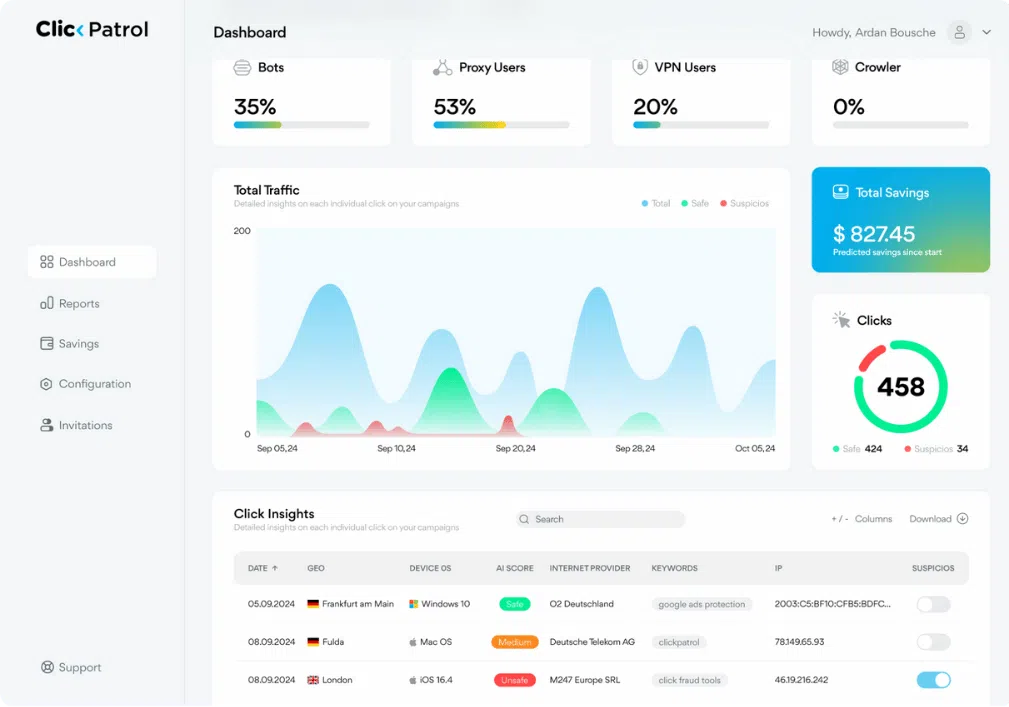
ClickPatrol for multinationals, in short
ClickPatrol runs click fraud protection in every market under one login, with each website and Google Ads account keeping its own settings, reports and team access.
- Markets and accounts
- One ID per website. Each is tied to one Google Ads account, all linked through your Manager Account (MCC), and you switch markets without logging out.
- What ClickPatrol does
- Scores, excludes, reports. Every paid click is scored and invalid sources are excluded in Google Ads. Local teams see their own reports without access to billing.
- Where it stops
- No ISO certificate of its own. ISO 27001, 27018 and 27701 belong to AWS, the hosting provider. Outside Google Ads the exclusion runs through your suspicious audiences.
- Procurement
- A DPA under Article 28 GDPR. Data hosted in the EEA (AWS Ireland, Google Cloud Netherlands) and notice of a breach within 48 hours. Security and privacy
- Price
- Quoted after a demo. PRO has volume pricing up to 75,000 protected clicks a month. Several brands, many markets or 100,000+ clicks get a custom quote. Excl. VAT. Book a demo
Across markets
What has to hold in every country you run ads
A protection standard is only as good as the weakest market. These are the parts a group rollout depends on.
| Requirement | How ClickPatrol handles it |
|---|---|
| Accounts and sites | Each website gets its own ClickPatrol ID, connected to one Google Ads account. All accounts link through your Google Ads Manager Account and sit under one login. |
| Who sees what | The account owner invites colleagues as Admin or as Reports and Dashboard only. Invited users cannot add accounts or see billing. |
| Local rules | VPN and proxy rules are set per account. In markets where many people browse through a VPN or proxy, leave them on Algorithm instead of a hard block. |
| Reports per market | Clicks split by campaign, keyword, device, network, country, region and browser language. The Public API returns monthly totals per website for your own dashboards. |
| Proof before rollout | Run a geo split: protection in one group of regions, the rest as control. Single campaigns can be left out of updates to serve as a control group. |
| Platforms | Google Ads with exclusions in the account. Meta, Microsoft Ads, LinkedIn, TikTok, Pinterest and DV360 through the ClickPatrol tag and audience exclusions. |
How it works
Connect, roll out, report, one market at a time
No change to bids, budgets or campaign structure in any market. ClickPatrol adds a tracking template, IP exclusions and one tag per website.
1Connect
Every market in its own account, under one login
Add each website in the dashboard and install its own ClickPatrol ID in that site's Tag Manager container. Its Google Ads account connects through your MCC. Each market appears under Website Overview as soon as traffic arrives, with its own currency and settings.
- One ID per website, never shared
- Accounts linked through the same MCC
- Switch markets from the account menu
2Roll out
Start every new market in monitor only mode
Monitor only mode scores every click without sending a single exclusion to Google Ads, so the local team can review before anything changes. Leave one campaign out of updates as a control group, then switch protection on when the numbers hold.
- VPN and proxy rules set for the local audience
- Control campaigns excluded from updates
- Invalid clicks reported to Google once live
3Report
Numbers per market for the group report
The Reports page splits each market by campaign, keyword, device, network and location. For a group view, the Public API returns monthly totals per website, including suspicious share and amount saved, ready for your own dashboard. How this compares with the brand team setup: same product, one brand instead of many markets.
- Read-only API key per website
- Monthly or click-level data
- CSV export from every report
Case study
Avis: one search team, several African markets
Search traffic quality in South Africa was harder to police than in Europe. Manual fixes never kept invalid clicks out; ClickPatrol became part of the daily routine.
 Car rental
- +123%
- conversions
- −36%
- cost per acquisition
- +91%
- click-through rate
Before ClickPatrol, we attempted to manually adjust our campaigns to solve the challenge of fake traffic. We tried to set our campaigns to target specific regions only, adding negative keywords and other methods, but they never really protected us from fake traffic.
Security and privacy
The file your procurement and IT teams will ask for
ClickPatrol B.V. is a Dutch company and processes click data on your behalf. Ask for the DPA or a security questionnaire at hello@clickpatrol.com. Market-specific notes: CCPA and CPRA and POPI Act.
Reviews
From marketing leaders who report upwards
4.974 reviews 5.018 reviews
 5.051 reviews4.523 reviews
Reduced click fraud and saved ad budget with ClickPatrol
“ClickPatrol was incredibly easy to set up it started monitoring our ad campaigns within minutes. The dashboard is clean and gives a clear view of where clicks are coming from.”
Tried a few tools, this one's the best
“Switched from ClickCease after comparing both for a couple of months. ClickPatrol catches more and the interface is less cluttered. Also appreciate that it doesn't feel like they're trying to upsell you constantly. Fair pricing, good product.”
Finally, Transparent and Effective Click Fraud Protection
“ClickPatrol feels like a tool designed by people who actually understand digital marketing pain points. The UI is clean, the fraud detection is accurate, and I can prove ROI improvements quickly to stakeholders.”
Read at the source on 16 November 2026 for G2, 4 November 2026 for Capterra and SourceForge, and 11 August 2026 for Trustpilot. Read all customer reviews
Get started
A rollout in three steps
Most groups start with a demo and one market, then add the others once the first numbers hold.
Book a demo
We go through your markets, accounts and Tag Manager containers, and agree which market goes first.
Connect the first market
Add its website, install its ClickPatrol ID and connect its Google Ads account through your MCC. Keep it in monitor only mode while the local team reviews.
Add the other markets
Repeat per website, set the local VPN and proxy rules, invite each team with the role it needs and switch protection on market by market.
Rather see it in one market first?
Start the 7-day trial on one website and its Google Ads account. It only measures, so nothing changes in that market until you switch protection on. A €0.01 card check is the only charge.
Done. We are opening your account.
Sent. Look in your inbox and create your account whenever it suits you.
Questions
Questions from group marketing teams
Can each market keep its own settings and reports?
Yes. Every website is its own account in ClickPatrol, with its own ID, Google Ads connection, protection rules and reporting. You manage them under one login and switch between them from the account menu. For one group view, pull the monthly report per website through the Public API.
How do we prove it works before a global rollout?
Run a geo split: protection in one group of comparable regions, the rest untouched as control, for 4 to 6 weeks with bids and budgets frozen. Measure protection first, such as suspicious clicks and exclusions, then performance. Monitor only mode lets a market watch before anything is excluded.
Who in our organisation can see what?
The account owner adds markets and invites colleagues. An Admin has full access within the accounts they were given; Reports and Dashboard only can view data and nothing else. Invited users cannot add accounts or see billing, so local teams get their numbers without the contract details.
Where is our data stored, and do you sign a DPA?
Data is hosted in the EEA, at AWS Ireland and Google Cloud Netherlands. ClickPatrol signs a data processing agreement under Article 28 GDPR and reports a breach within 48 hours. Ask for the DPA at hello@clickpatrol.com or during the demo.
How is it priced across many markets?
Per protected clicks. PRO covers 10,000 to 75,000 clicks a month for one brand. Several brands, many markets or more than 100,000 clicks a month go on a custom quote after a demo, with onboarding for your teams. Prices exclude VAT.
Related pages for international teams
Regional Companies
Some markets are run locally. See how regional campaigns separate invalid out-of-area clicks from real visitors.
See regional campaignsAdtech & B2B SaaS
Global software brands buy expensive B2B clicks. How those campaigns stay on real decision-makers.
Read the B2B SaaS pageTravel & Hospitality
Travel brands sell across borders and seasons. How they protect peak-season spend.
Read the travel pagePlan the rollout with us, market by market
Book a demo and we map your accounts, sites and teams to a rollout plan. Or start the trial on one market today. Background on click fraud protection for every platform you run.
Start with one market
Done. We are opening your account.
Sent. Look in your inbox and create your account whenever it suits you.