
 English
 Nederlands
Device fingerprint
The mix of hardware and software details a browser gives away. Hidden or impossible device data is a warning sign, and you can choose to treat unknown devices and operating systems as suspicious.
ClickPatrol weighs device, network and behaviour on every click and never acts on an IP address alone. Review the verdicts in Monitor Only Mode, then let the exclusions run.
Done. We are opening your account.
Sent. Look in your inbox and create your account whenever it suits you.
21 UK agencies: 6%+ media savings across 5M+ clicks
 4.9
 4.5
Google Certified Click Tracker
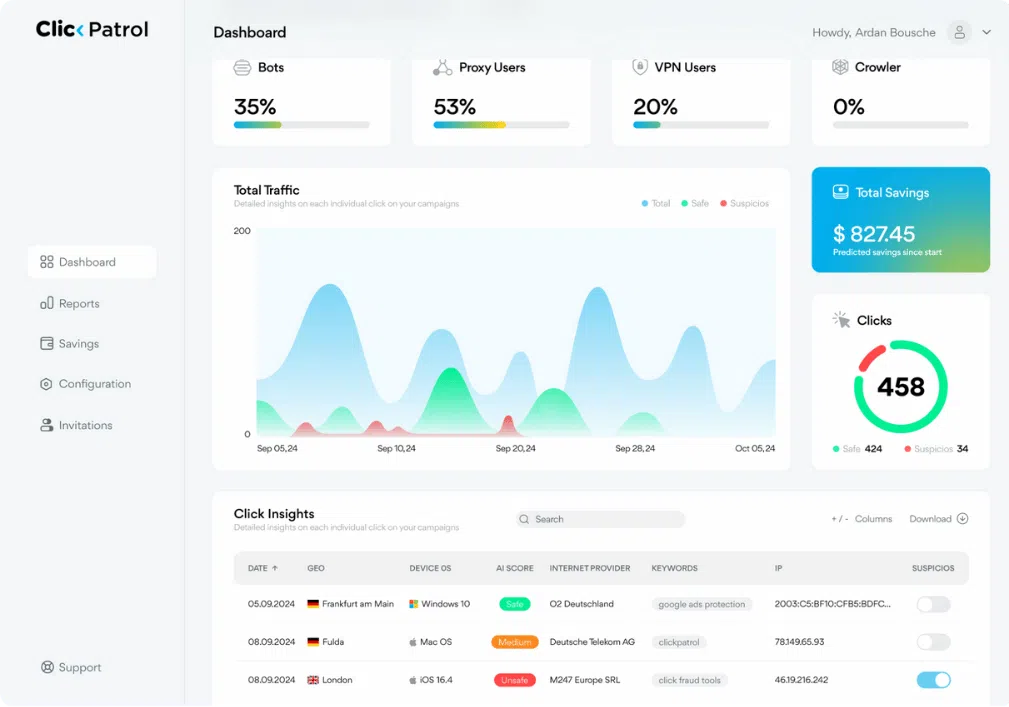
Every Google Ads click gets a risk level from its device, network, behaviour and click pattern; ClickPatrol excludes only high-risk sources and watches the suspicious ones.
The signals
Each signal feeds the same score behind ClickPatrol's click fraud protection. A bot can hide one of them; hiding all of them at once is far harder.
The mix of hardware and software details a browser gives away. Hidden or impossible device data is a warning sign, and you can choose to treat unknown devices and operating systems as suspicious.
Whether browser, operating system and connection fit together. A mobile browser arriving from a server network is the kind of mismatch that gets a closer look.
How the visitor moves, scrolls and clicks after landing. Behavioural biometrics separate a person reading a page from a script loading it.
Traffic routed to hide where it comes from. Some real visitors use a VPN, so ClickPatrol weighs it rather than blocking it outright, unless you set that rule yourself.
How often one source clicks, how fast and on which campaigns. The same IP clicking 3 times in 10 minutes is exactly what a click threshold rule catches.
A verified conversion tells ClickPatrol the visitor was real. With conversion tracking on, a customer flagged by mistake can be released and is not blocked again on a return visit.
Checking for bots by hand instead? How to detect bot traffic on your website walks through the manual route.
How it works
Every step shows up in the dashboard, so you can show a client exactly what happened to a click and why.
1Score
Each row is one click: time, location, ad platform, score, internet provider, browser, IP address and whether that IP is blocked. Filter the table or download it, for instance when a client asks why a click was excluded.
2Tune
Under Configuration, each traffic-type rule (VPN, proxy, dark web, unknown devices, unknown operating systems and AI bots) starts on Algorithm. Set one to a hard block only when you know the audience: in some regions real people browse through VPNs or proxies.
3Pass on
On a site with the ClickPatrol tag, every ad visit pushes a Legitimate or Suspicious event into Google Tag Manager. Fire your Meta, LinkedIn or TikTok pixel on the legitimate event only, or build a suspicious audience and exclude it. What that problem looks like in an account is on our bot traffic page.
Checks and corrections
No detection is perfect, and on a client account a wrong exclusion costs more than a missed bot. These are the controls for checking and correcting it.
Every click is scored, but no exclusions are sent to Google. Review what would have been blocked, then switch the toggle off. It is the sensible start for any account where losing one real customer would hurt.
Add an address, or a whole range with a wildcard such as 203.0.113.*, and it is never blocked. Put your own office and your agency on it before anyone tests the ads.
Usually it was excluded in another campaign, made room on the 500-address list for a riskier one, or the visit came before the exclusion. Monitoring tools that open tagged links appear too, without a paid click. To manage exclusions by hand, see how to exclude IP addresses in Google Ads.
After a big change in targeting or settings, Blocked IP Cleanup removes every blocked IP within 24 hours. Detection keeps running, so invalid sources are excluded again as soon as they click.
Results
The agencies connected client accounts, kept a monitoring baseline first and then switched blocking on. Light rule changes only where a budget or goal called for it.
We’re a marketing agency, and we rolled out ClickPatrol on a number of client accounts. It's been reliable, and the multi account setup works well. In some cases, we added fraud protection without telling our clients. They saw performance improvements first.
Get started
You need Standard or Admin access on the client's Google Ads account, or on your manager account (MCC) above it.
Use your work email and a €0.01 card check. The 7 days bill nothing else.
Pick the client account under your manager account. Each client gets its own account in ClickPatrol, with separate settings and reports.
Read a week of verdicts in Click Insights. Switch protection on, and keep Monitor Only Mode on a little longer for a client who cannot afford to lose traffic.
Reviews
4.974 reviews 5.018 reviews
 5.051 reviews4.523 reviews
“Detailed reporting helps identify every invalid click, while automated click blocking saves valuable ad spend. Managing multiple client campaigns is now much simpler.”
“Not much to say other than it simply works. Setup was quick, it runs quietly in the background, and our ad spend is being used more efficiently now. Exactly what you’d want from a tool like this.”
“ClickPatrol helped me detect over 20% invalid traffic in the first week. Their algorithm works perfectly, and the reporting dashboard gives me complete visibility. The tool is reliable, affordable, and essential for protecting ad investments. I’ll definitely continue using it long-term.”
Read at the source on 16 November 2026 for G2, 4 November 2026 for Capterra and SourceForge, and 11 August 2026 for Trustpilot. Read all customer reviews
Questions
It is built not to. No block rests on an IP address alone, suspicious traffic is only watched, and a verified conversion counts in a visitor's favour. If a real customer is excluded anyway, whitelist their IP and they see the ads again. For sensitive accounts, start in Monitor Only Mode.
Yes. Every client account keeps its own settings and reporting, so a strict VPN rule for one client never touches another. You switch between clients from the account menu without logging out. The client accounts need to sit under the same Google Ads manager account (MCC). See ClickPatrol for agencies.
Find the click in Click Insights. The row shows time, location, platform, score, internet provider, browser and IP address, and whether that IP is blocked. Export the table to share it. Google gives no click-level detail on its own invalid clicks, so this is the record you can put in front of a client.
It scores those visits too, through the ClickPatrol tag and the tracking parameters on your ads. The label then shuts them out through your audiences: you exclude the suspicious audience on Meta, and on LinkedIn the Insight Tag fires on legitimate visits only.
Leave them on Algorithm unless you know the audience well. The algorithm weighs many signals per click, while a hard rule blocks a whole traffic type. Set click threshold rules generously at first, for example 5 clicks in one day, and tighten them only when you see repeat clicking.
Connect an account, let the trial score a week of Google Ads clicks and see why each flagged click was flagged. Nothing is excluded until you switch protection on, and cancelling within 7 days costs nothing more.
Done. We are opening your account.
Sent. Look in your inbox and create your account whenever it suits you.