
 English
 Nederlands
Your ads stop showing halfway through the day
By midday your daily budget is spent. The afternoon and evening, when many customers search, your ads are invisible. Your competitor’s ads run until midnight.
Competitors click your ads to empty your daily budget, so theirs keep running. Blocking their IP by hand does not last, because the address changes. ClickPatrol scores every click on more than 800 signals and excludes the repeat sources in your account.
Done. We are opening your account.
Sent. Look in your inbox and create your account whenever it suits you.
Conservio suspected competitors. ClickPatrol found up to 14% non-human clicks.
 4.9
 4.5
Google Certified Click Tracker
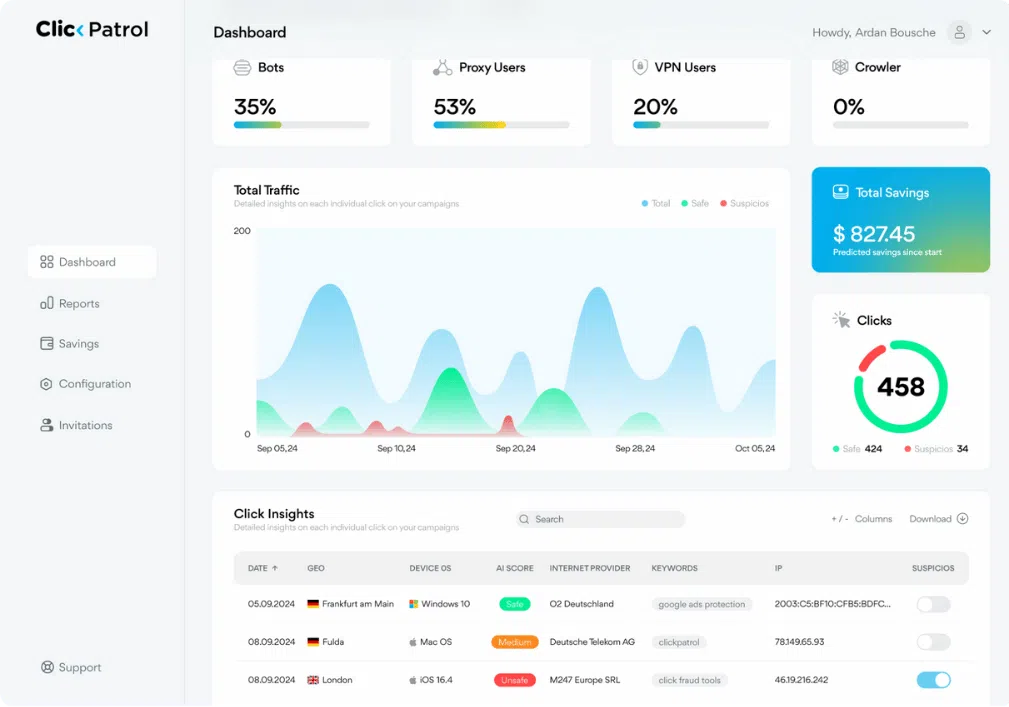
ClickPatrol spots the pattern of a competitor who keeps clicking your ads and excludes that source in your Google Ads account, so your ads stop showing to it.
The problem
Competitor click fraud is not random. It is often a pattern. Competitors click your ads during busy hours to burn through your daily budget. Once your budget is gone, your ads disappear while theirs keep running. You lose visibility, your data fills with non-buyers and the clicks can look normal in your reports.
Those are clicks on the ads themselves. Buying ads on searches for your name is brand bidding, and you fight that in the auction, not with IP blocks.
Learn more about click fraud · Case studies of competitor click fraud · How to stop competitors clicking Google Ads, step by step
An example with round numbers
Recognize this?
By midday your daily budget is spent. The afternoon and evening, when many customers search, your ads are invisible. Your competitor’s ads run until midnight.
In a market with 3-5 competitors, everyone knows it happens. But Google Ads does not show you who clicked. You suspect it, but you have no evidence.
You manually add IPs to your exclusion list. Next day, the same pattern from a different IP. They use VPNs, proxies and residential IPs. You will never keep up.
At €50 per day, just 3 invalid clicks of €15 can eat almost your entire budget. You are offline for the rest of the day while your competitor keeps showing.
Winter for heating engineers, summer for AC installers, spring for roofers. The season where every customer counts the most is also when competitors click the hardest.
Your campaign shows healthy click-through rates. But calls are down. The clicks happened. The people behind them were never going to buy.
Why manual IP blocking falls short
They switch through VPNs, proxies and residential IPs. That is why a hand-made exclusion list turns into daily maintenance and still misses the pattern.
| Topic | Blocking IPs by hand | With ClickPatrol |
|---|---|---|
| Changing addresses | A competitor on a VPN, proxy or residential IP shows up with a new address the next day. | Device, network and behaviour are scored together, so the pattern is recognised when the address changes. |
| List size | Google Ads allows up to 500 IP exclusions per campaign, and you keep that list up to date yourself. | ClickPatrol manages the list and keeps it on the addresses that pose the most risk right now. |
| Evidence | Google Ads does not show you who clicked, so you are guessing. | Click Insights shows every click with its network, location, device and score. |
| Real customers | An office or mobile network can carry customers and competitors on the same address. | No single data point, the IP included, triggers a block on its own. |
| Your time | Checking reports and adding addresses, every week. | Exclusions go to Google Ads automatically while you run the business. |
A competitor who keeps clicking leaves a trail of repeat visits. Decide how often one address may click your ads, and ClickPatrol blocks anyone who goes over the limit.
Case study
A conservation travel company with 11 to 50 people. Spend kept rising while conversions lagged, and the team had a feeling that competitors were behind it.
 Travel
Something just doesn’t feel right, we have a gut feeling that competitors were either checking our pricing, scraping our website, or deliberately sabotaging our campaigns.
Reviews
4.974 reviews 5.018 reviews
 5.051 reviews4.523 reviews
“We were skeptical at first because we thought Google already filters out invalid clicks. Turns out they miss a LOT. ClickPatrol showed us exactly what was slipping through. After 3 months of use our lead quality is way up and we're spending less to get the same results. Can't imagine running ads without it now.”
“I run a small law firm and spend a fair amount on Google Ads. I had no idea how much of the budget was being wasted until a marketing consultant recommended ClickPatrol. Seeing the data was eye-opening. Our cost per acquisition has gone down significantly, and I finally feel like I’m getting proper value from my ad spend.”
“Gives full transparency into traffic sources. Detects bots, VPNs, and duplicate clicks. Easy to customize the blocking settings.”
Read at the source on 16 November 2026 for G2, 4 November 2026 for Capterra and SourceForge, and 11 August 2026 for Trustpilot. Read all customer reviews
Get started
No code, no developer and no changes to your campaigns.
Enter your work email and verify your card with €0.01. Nothing is billed during the 7 days.
Sign in with Google and ClickPatrol places the tracking template for you.
Every click is scored from the start. Switch protection on when you have seen enough, and repeat sources are excluded.
Questions
Yes. Competitors can repeatedly click your Google Ads to burn through your daily budget, so your ads drop out of the auction and theirs take over. It can be done by hand or with automated tools, and it is a common form of invalid traffic. Across all kinds of invalid clicks, ClickPatrol customers save 9% of their ad budget on average, and up to 21% in some industries.
ClickPatrol analyses more than 800 data points on every click and recognises competitor clicks, bots, scrapers, VPNs and other invalid traffic. Once protection is on, it excludes those sources in your Google Ads account, so your ads stop showing to them. No manual lists needed.
You see the source behind every click in Click Insights: network, location, device, IP and score. Google Ads does not share who clicked, so ClickPatrol cannot give you a company name, but repeat patterns from one source stand out quickly.
The limit is 500 per campaign. ClickPatrol manages the list for you and keeps it on the addresses that pose the most risk right now. Addresses that are no longer suspicious make room for new ones.
Common signs include repeated clicks from the same networks or locations with no conversions, sudden spikes in click volume and a rising cost per conversion. ClickPatrol classifies suspicious versus legitimate traffic and shows you exactly which clicks are invalid and where they come from. During the trial you see how many of these clicks your ads attract and what they cost you.
About 2 minutes. Create your account, connect Google Ads and ClickPatrol places the tracking template. There is no code to install and nothing changes in your campaigns. During the trial ClickPatrol measures; blocking starts when you switch protection on.
Yes. The 7-day trial shows how many competitor clicks and how much other invalid traffic reach your ads, and what that costs you. A card is needed for a one-time €0.01 check; nothing is billed during the trial.
Yes. ClickPatrol is built in the Netherlands, complies with GDPR and CCPA, and hosts data in the EEA (AWS Ireland and Google Cloud Netherlands). Google lists ClickPatrol as a certified click tracker. See security and privacy.
Start the 7-day trial and see which clicks come from repeat sources, and what they cost you. Setup takes about 2 minutes.
Done. We are opening your account.
Sent. Look in your inbox and create your account whenever it suits you.